

If you are still relying on a standard browser pixel to feed your ad accounts, you aren't just losing data—you're actively sabotaging your performance. In the current landscape of Advantage+ and Performance Max, the algorithm is your media buyer. But an algorithm is only as smart as the signals it consumes. When you send low-fidelity data, you train the AI to find the 'cheapest' converters who might never actually buy, or worse, junk leads that clog your CRM.
By the end of this guide, you will have a blueprint for a high-fidelity conversion data layer. This isn't about simple reporting; it's about building a feedback loop that tells Meta, Google, and TikTok exactly which users represent real enterprise value. You will need access to your Google Tag Manager (GTM) container, a server-side tagging environment (like Stape or GCP), and your CRM API keys before we begin.
TL;DR: Key Takeaways
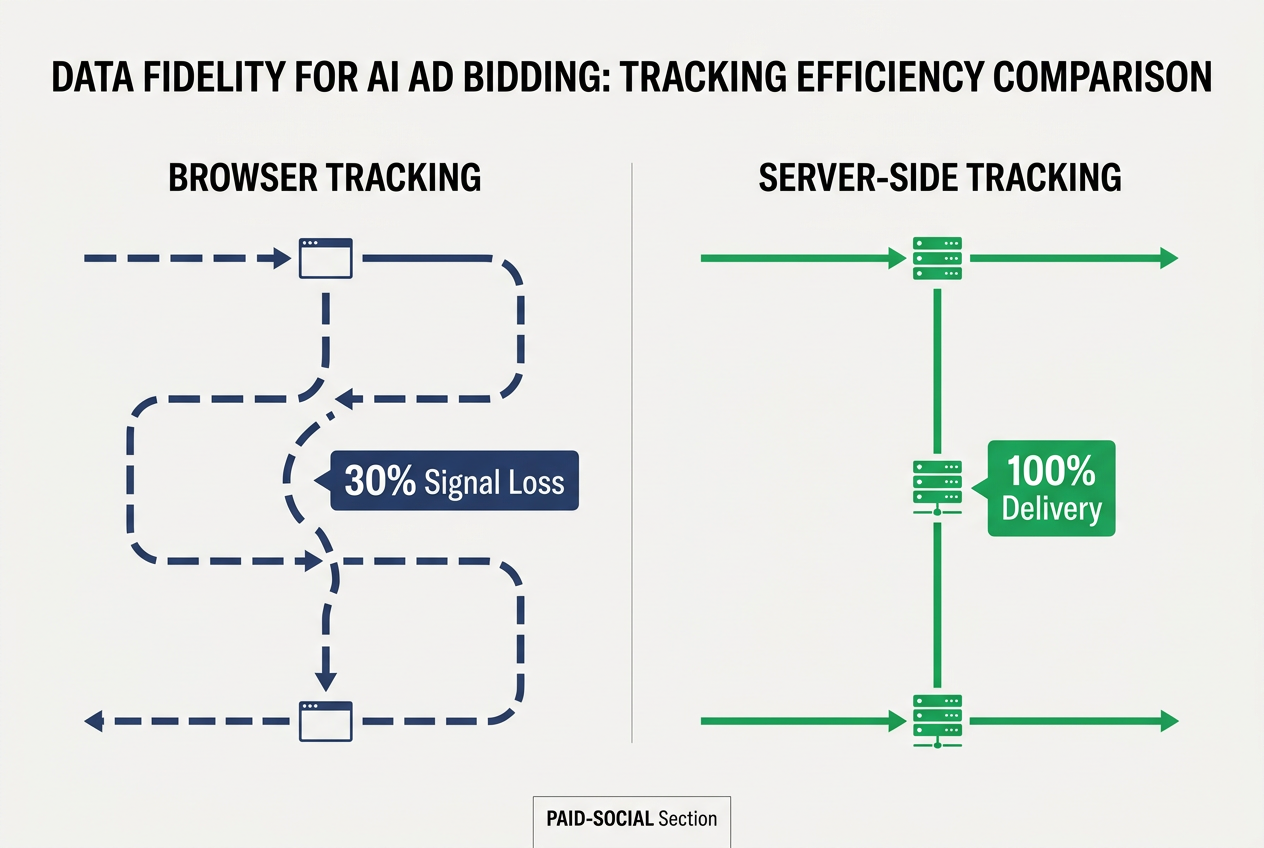
- Signal Loss is Performance Loss: Browser-only tracking now misses 30-60% of events due to ITP and ad-blockers, leading AI bidding models to optimize for incomplete datasets.
- Server-Side is Mandatory: Moving to a server-to-server (S2S) architecture like Meta CAPI ensures 100% event delivery and allows for data enrichment before the signal reaches the ad platform.
- Quality Over Quantity: Feeding 'junk' signals (like accidental clicks or bot leads) into AI models creates a negative feedback loop that increases your CPA over time.
Step 1: Audit Your Current Signal Health and Identify the Gap
You can't fix what you haven't measured. Most marketers look at their dashboard and see a 20% discrepancy between Shopify/CRM and Meta Ads and assume it's just 'attribution.' It’s often not. It’s signal loss. If the pixel doesn't fire, the AI never knows that specific user profile was a success.
Start by comparing your raw server logs or CRM records against your platform-reported conversions over a 30-day window. If you're seeing a gap larger than 10%, your bidding model is operating on a partial map. According to internal benchmarks from top-tier performance agencies, accounts with a 'Good' or 'Great' Event Match Quality (EMQ) score on Meta see a 15-20% lower CPA than those with 'Poor' scores.
Check your Meta Events Manager. Look for the 'Event Match Quality' column. If your Lead or Purchase events are scoring below a 6.0, the platform is struggling to link your conversion data to its user base. This means when you bid for 'Conversions,' Meta is guessing.
Common Pitfall: Relying on the 'Aggregated Event Measurement' tab as a sign of health. That is a compliance tool, not a data quality tool. You need to look at the raw match keys—email, phone, fbp, and fbc—being sent with each hit.
Step 2: Transition to a Server-Side Tagging Architecture
The browser is a hostile environment for marketers. Safari's Intelligent Tracking Prevention (ITP) and Chrome's impending (though delayed) third-party cookie phase-out mean the shelf life of a browser-side cookie is often less than 24 hours. To build a high-fidelity layer, you must move the logic from the user's device to a server you control.
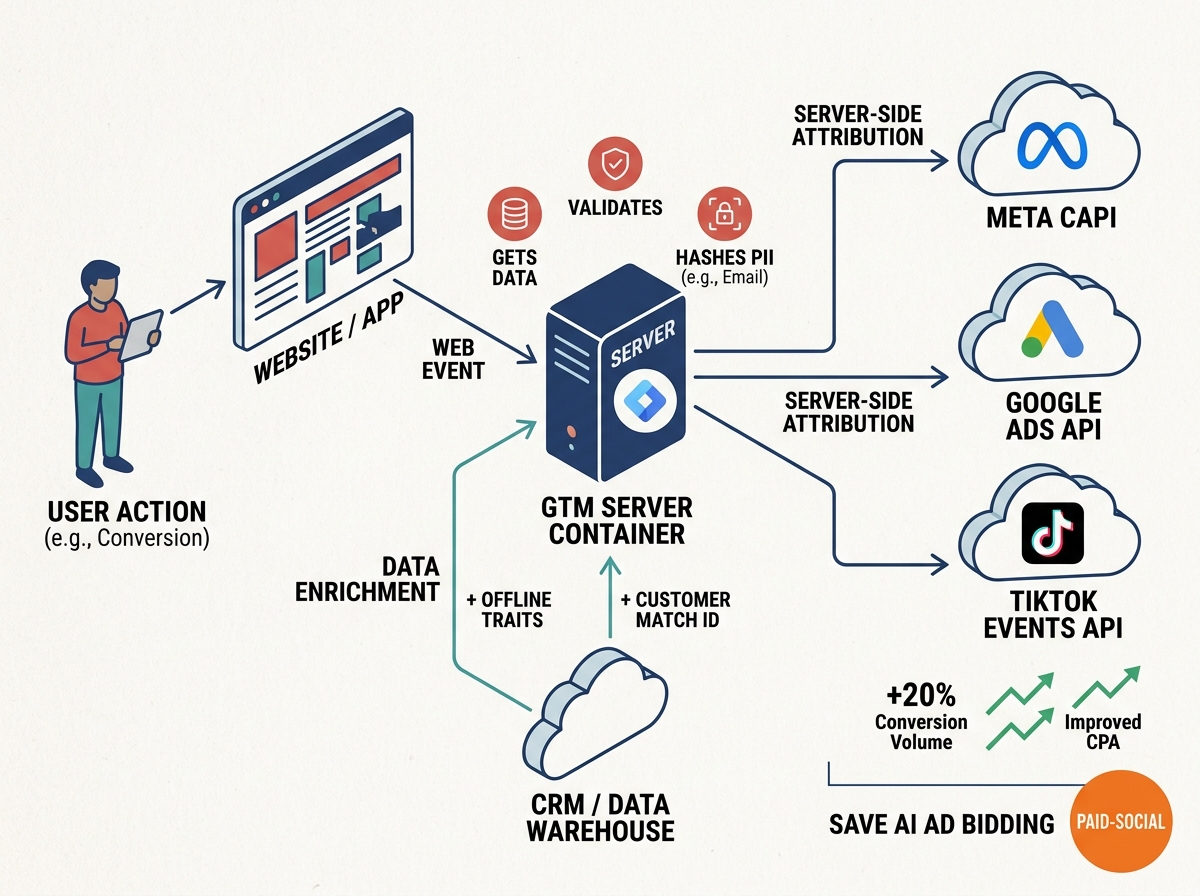
Using Google Tag Manager (GTM) Server-Side is the industry standard for this. Instead of the user's browser sending data directly to Meta or Google, it sends one single stream of data to your server. Your server then cleans, hashes, and forwards that data to the ad platforms.
This matters because it allows for 'Data Enrichment.' In a browser setup, you can only send what's on the page. In a server-side setup, you can intercept the event, query your own database to find that user's Lifetime Value (LTV), and append it to the conversion before it hits the ad platform. Now, instead of telling the AI 'someone bought for $50,' you're telling it 'a high-value repeat customer bought for $50.' The AI bidding model will pivot its targeting to find more people like that.
Common Pitfall: Setting up server-side tracking but failing to use a custom loader or a first-party domain (e.g., metrics.yourbrand.com). If you use the default GTM server URL, ad blockers will still kill the signal before it reaches your server.
Step 3: Implement Meta Conversions API (CAPI) with Redundancy
Meta CAPI is the most critical integration for paid social buyers today. However, the 'best practice' isn't to replace the pixel, but to use a redundant setup. You want the browser pixel and the CAPI to fire simultaneously. Meta’s deduplication engine uses the event_id parameter to ensure it doesn't count the same sale twice.
Why do both? Because the browser pixel still provides valuable 'warm' data like IP address and User Agent that the server might not capture perfectly, while the CAPI provides the 'hard' data that the browser misses.
To do this correctly, you must ensure your event_id is identical across both sources. If they don't match, you'll double-count conversions, your ROAS will look fake-amazing for three days, and then your AI bidding will collapse because it thinks it has found a goldmine that doesn't exist.
How Meta's new Reels ranking changes paid budget pacing
Common Pitfall: Sending PII (Personally Identifiable Information) like emails or phone numbers in plain text. Meta requires these to be SHA-256 hashed. If you send raw data, Meta’s API will reject the entire batch, leaving your AI bidding model blind for that period.
Step 4: Build a Feedback Loop for Lead Quality (Offline Conversions)
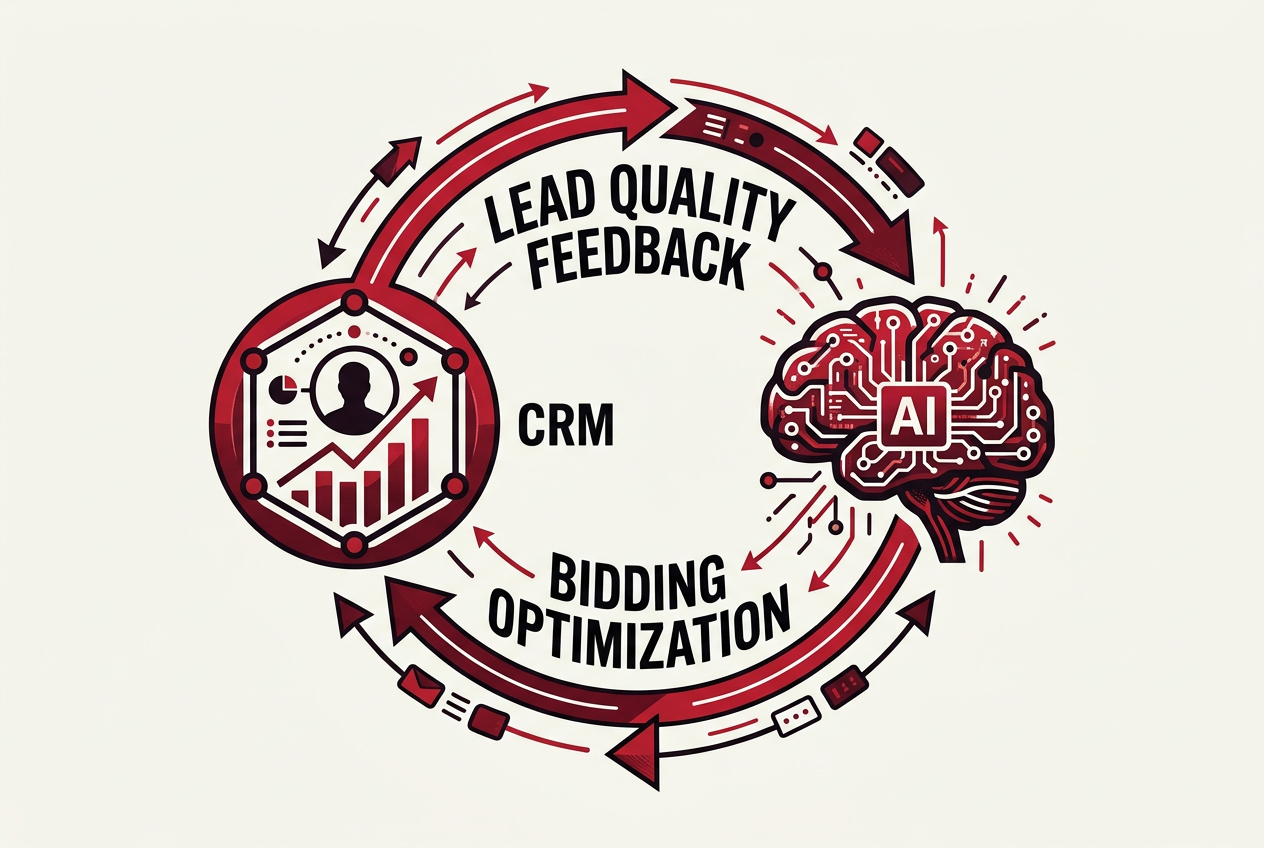
For B2B or high-ticket B2C, the 'Purchase' doesn't happen on the website. It happens in a CRM like Salesforce or HubSpot weeks later. If you only optimize for 'Lead' (the form fill), the AI will find you the people most likely to fill out forms—who are often 'professional lead-gen bots' or low-intent window shoppers.
To save your AI bidding, you must upload 'Offline Conversions.' This involves sending data back to the ad platform when a lead moves from 'New' to 'Qualified' or 'Closed Won.'
When you upload a 'Closed Won' event with a high value, the ad platform's lookalike and broad targeting models stop looking for 'Form Fillers' and start looking for 'Buyers.' This is how you scale a budget from $1,000/day to $10,000/day without the lead quality falling off a cliff. A recent study by Search Engine Journal [S3] noted that 61% of CMOs find local and complex marketing difficult; much of this complexity stems from the inability to tie digital spend to physical or CRM-based outcomes.
Common Pitfall: Waiting too long to upload offline data. AI models have a 'memory' window (usually 7-28 days). If you upload a conversion 60 days after the click, the platform can't easily attribute it back to the specific ad/creative that drove the intent, and the bidding model won't learn.
Step 5: Verify Your Data Fidelity and Monitor 'Signal Loss' Weekly
Once the pipes are built, you need a dashboard to monitor health. In Meta Events Manager, you should see 'Server' and 'Browser' events for every major action. The 'Overlapping' percentage should be high, and your deduplication rate should be near 100%.
In Google Ads, check your 'Diagnostics' tab under Conversions. Look for 'Enhanced Conversions' status. If it says 'Recording,' it means Google is successfully using hashed user data to recover conversions that would have been lost to cookie expiration.
We recommend a weekly 'Signal Audit.' Compare your platform-reported 'Purchase' count to your actual bank-record 'Purchase' count. In a post-iOS 14 world, they will never match perfectly, but with a high-fidelity data layer, you should be within a 5-8% margin of error. If that gap widens, it usually means a developer changed a piece of code on the checkout page that broke your data layer.
Common Pitfall: Ignoring the 'Warning' icons in ad platforms. Those yellow triangles are usually telling you that your match rate has dropped. A drop in match rate is a leading indicator that your CPA is about to spike.
Next Steps to Refine Your Strategy
Now that your data layer is solid, you can move into more advanced optimization tactics:
- Value-Based Bidding (VBB): Instead of bidding for 'Conversions' at a target CPA, bid for 'Value' at a target ROAS. This tells the AI to prioritize the $500 basket over the $50 basket.
- Predictive LTV Modeling: Use your server-side layer to send a 'Predicted Value' event 24 hours after a user signs up, based on their initial behavior. This gives the AI a faster feedback loop than waiting for a 6-month sales cycle.
- Creative Resonance Analysis: Use your clean data to see which creatives drive 'High-Value' customers versus 'Discount-Seekers.' Often, the ad with the lowest CPA actually has the worst LTV.
Building this infrastructure is no longer an 'advanced' move; it is the baseline for survival. As platforms like LinkedIn [S2] and Instagram [S4] continue to refine their algorithms toward AI-driven automation, the only lever left for the marketer is the quality of the data they provide. Stop fighting the algorithm and start feeding it.
Understanding how the LinkedIn algorithm works in 2026
Verification: How to Know Your Data Layer is Working
You will know your high-fidelity layer is successful when you see three things: First, your Event Match Quality (EMQ) score in Meta stays consistently above 7.0 for all primary conversion events. Second, the discrepancy between your CRM and your ad platform remains under 10% for more than two consecutive weeks. Third, and most importantly, your 'Broad' or 'Advantage+' campaigns begin to outperform your hyper-targeted interest-based audiences. This is the ultimate sign that the AI has enough high-quality data to find your customers without you holding its hand.
FAQ