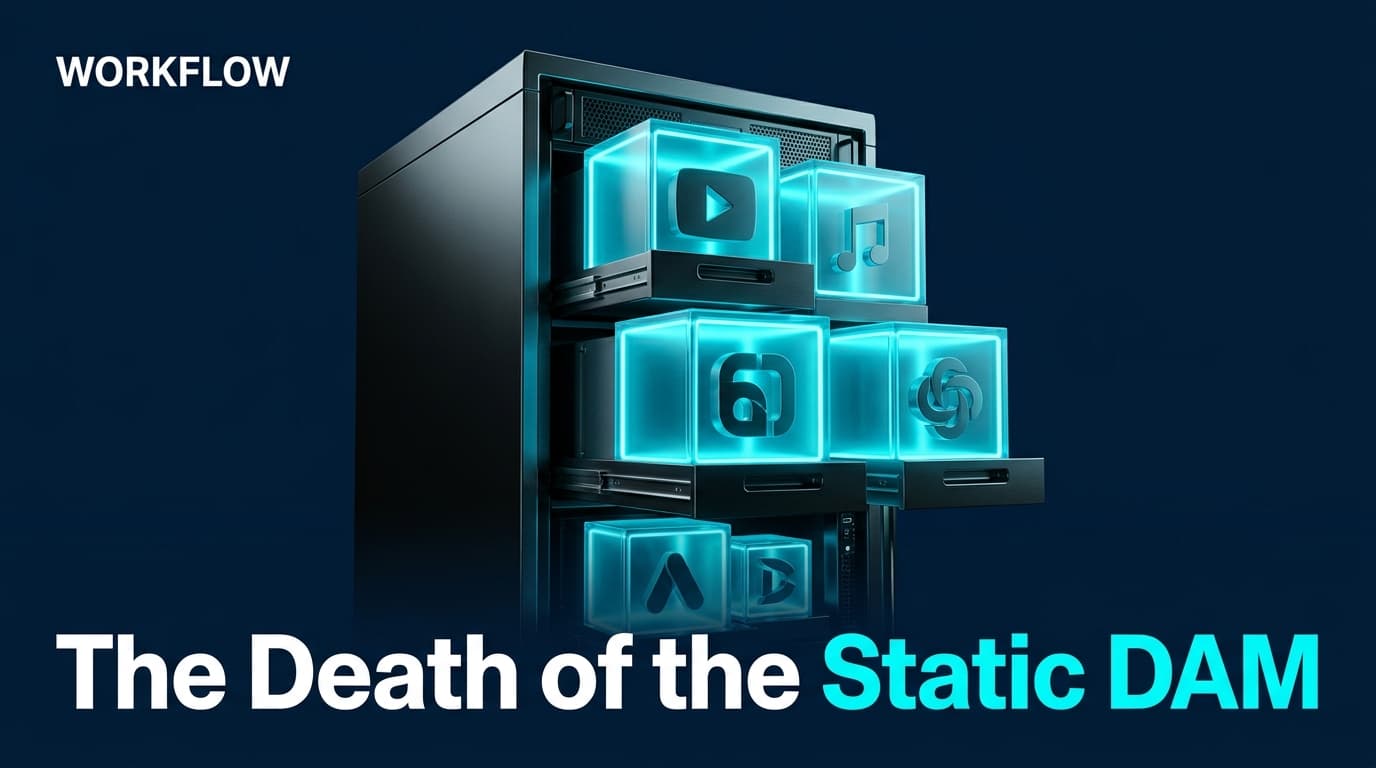
Traditional Digital Asset Management (DAM) systems have long been the place where great creative goes to die. They are essentially digital graveyards—static repositories where files are buried under vague naming conventions like 'Summer_Campaign_Final_v2_FINAL.mp4.' In the era of algorithmic feeds and generative AI, this passive storage model is a liability. If your assets aren't structured for machine readability, you aren't just losing time; you're losing the ability to compete on platforms that now demand hyper-personalized, high-velocity creative.
By following this guide, you will transform your content storage into an 'AI-Ready' activation engine. You'll move from a system that simply holds files to one that feeds them directly into automated ad-buying tools and generative creative suites. This is the shift from Brand Sovereignty to Brand Evidence—a concept Bill Hunt recently explored in Search Engine Journal, noting that AI rewards the highest-confidence evidence over mere optimization.
Before you begin, you will need administrator access to your current DAM or cloud storage provider (SharePoint, Box, Brandfolder, etc.), a standardized taxonomy of your product SKUs, and a clear understanding of your primary paid-social performance metrics.
TL;DR
- Deconstruct Assets: Move away from 'finished' files toward atomic assets (raw clips, transparent PNGs, clean audio).
- Machine-Readable Tagging: Implement a 'Confidence-First' metadata schema that AI agents can parse without human intervention.
- API-First Architecture: Ensure your repository can push data to tools like Meta’s Advantage+ or TikTok’s Creative Challenge via API.
- Dynamic Updating: Use new platform features, like Instagram’s recent ability to swap audio on existing posts, to keep your repository 'living.'
Step 1: Deconstruct the 'Final' Asset into Atomic Components
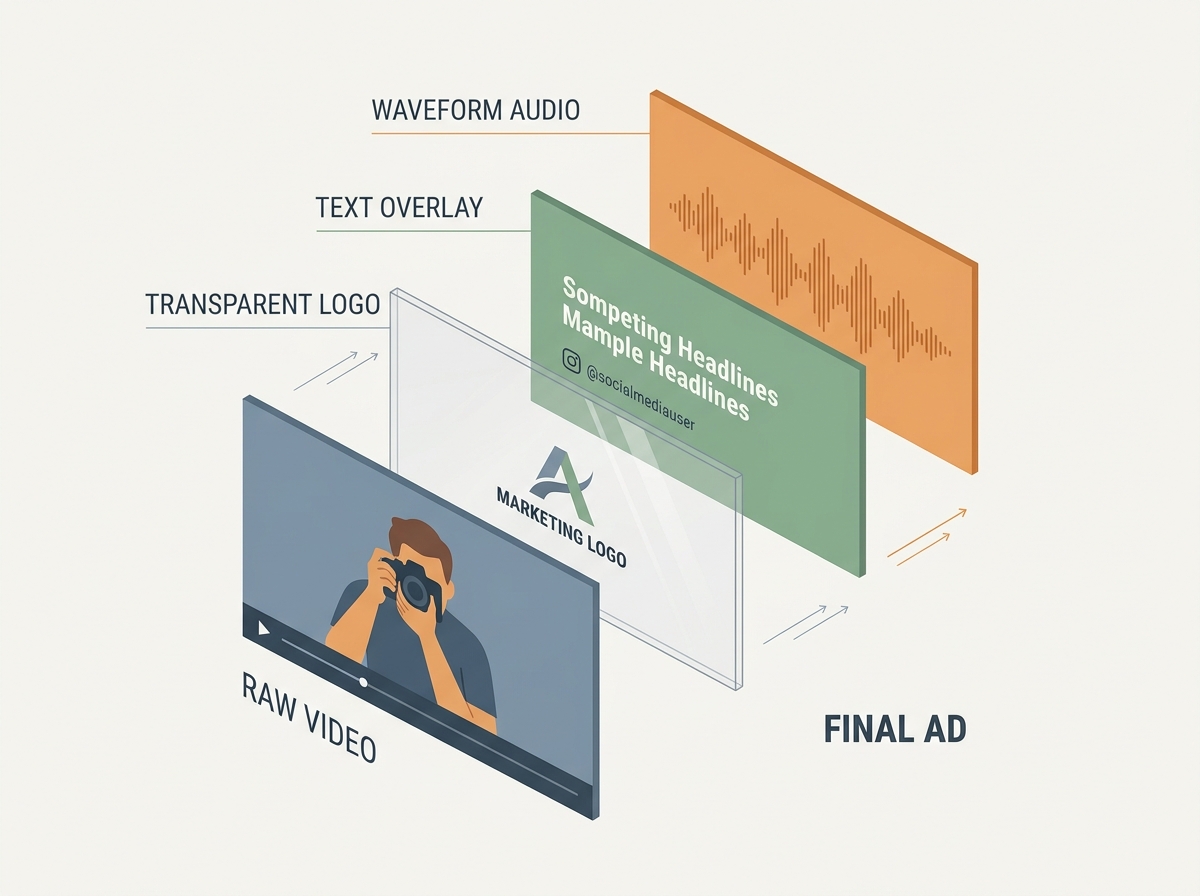
Modern marketing automation doesn't need your finished 30-second spot. It needs the building blocks. When you upload a flattened video file to a traditional DAM, you are locking away the value. To make a repository AI-ready, you must store assets in their most 'atomic' form. This allows generative tools to recombine elements based on real-time performance data.
Think of this like a meal kit. Instead of a pre-cooked frozen dinner (the final ad), you are providing the pre-chopped vegetables and proteins (the raw clips, the logos, the music tracks). This approach is what allows brands like American Eagle to reach fragmented subcultures, as seen in their recent back-to-school push. By using brand ambassadors like Lamine Yamal across different Gen Z segments, they aren't just running one ad; they are running dozens of variations powered by modular creative.
What to do: Audit your next campaign and ensure that for every 'Hero' asset, you also upload:
- The raw, un-color-graded A-roll footage.
- Transparent PNGs of all logos and product shots.
- Separate audio tracks (VO, SFX, and Background Music).
- Clean plates (footage without text overlays).
Why it matters: Generative AI video editors, as highlighted by Buffer’s recent testing of 11 top tools, require clean inputs to perform 'studio quality' edits. If an AI tool has to struggle to remove an existing text overlay from your video, the output quality will degrade. By providing clean components, you enable tools to swap out music or text dynamically. This is particularly relevant given Instagram's July 2026 update which allows users—and soon, potentially advertisers—to change music on existing posts.
Common Pitfall: Storing only the 'High Res' master. While quality matters, flexibility is the currency of AI. A 4K master with burnt-in subtitles is less valuable to an automated workflow than a 1080p clean clip and a separate .SRT file.
Step 2: Implement a 'Confidence-First' Metadata Taxonomy
AI doesn't 'see' your images; it reads the data associated with them. Most DAMs rely on manual tagging, which is prone to human error and inconsistency. An AI-ready repository uses a 'Confidence-First' approach. This means every tag must be verifiable and structured in a way that an LLM or a computer vision model can use to categorize the asset's intent.
As Bill Hunt noted in Search Engine Journal, organizations must earn the 'confidence' of AI agents. If your metadata says an image is 'lifestyle' but the AI detects it as 'product-focused,' the conflict creates a low-confidence signal. This can lead to your assets being suppressed in automated placements or incorrectly utilized by generative tools.
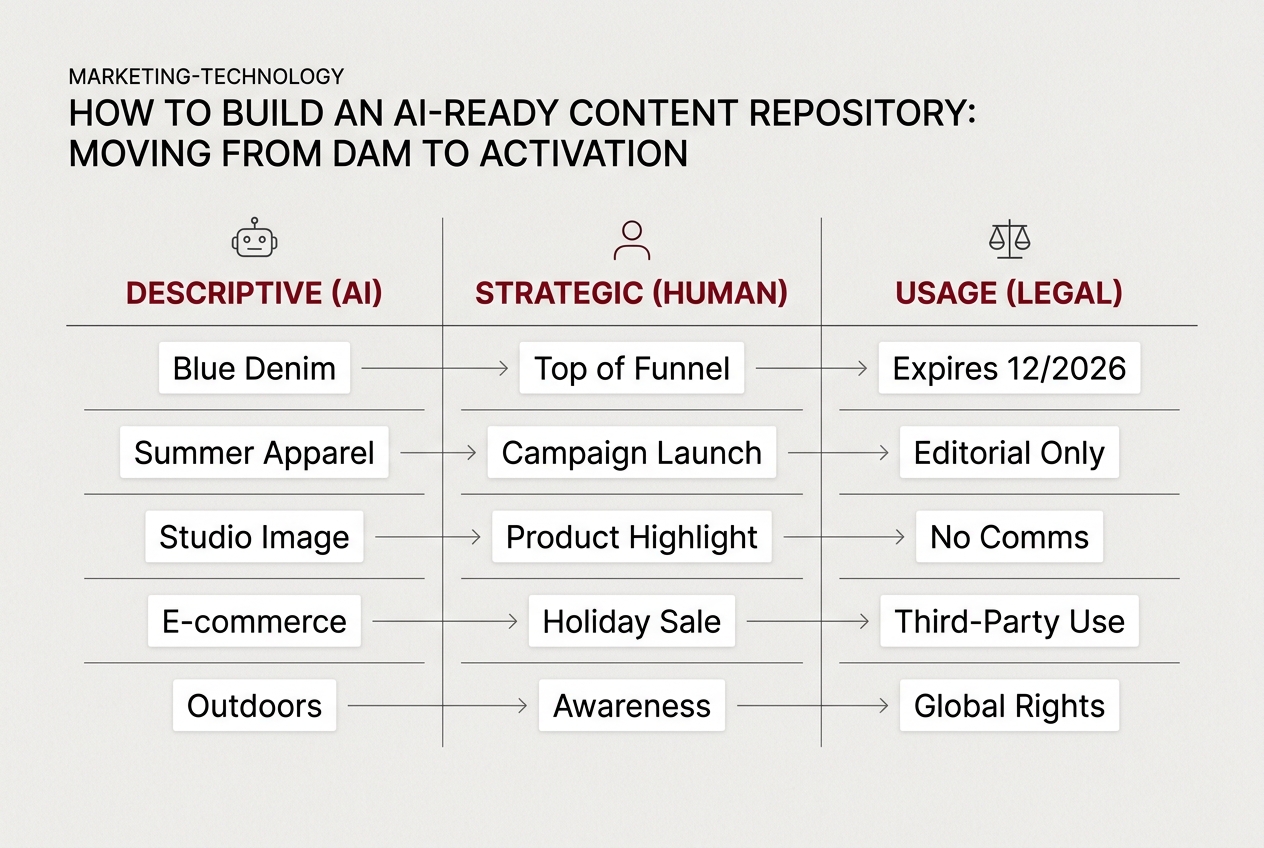
What to do: Standardize your metadata fields into three distinct buckets:
- Descriptive (The 'What'): Automated tags generated by computer vision (e.g., 'blue denim jacket', 'outdoor lighting', 'Gen Z male').
- Strategic (The 'Why'): Manual tags that define the persona or funnel stage (e.g., 'Top of Funnel', 'Subculture: Skater', 'Ambassador: Lamine Yamal').
- Rights & Usage (The 'When'): Hard dates for talent expiration and platform-specific licensing (e.g., 'TikTok only', 'Expires Dec 2026').
Why it matters: When you feed these assets into a tool like Meta’s Advantage+ Creative, the platform uses its own AI to determine which creative is likely to convert. If your metadata is already aligned with the platform’s internal categories, you reduce the 'learning phase' for your ads. You are essentially pre-optimizing your content for the algorithm.
Common Pitfall: Over-tagging with subjective adjectives. Avoid tags like 'beautiful' or 'engaging.' These are meaningless to an AI. Stick to objective attributes that can be cross-referenced with performance data.
Step 3: Establish API-Driven Activation Pipelines
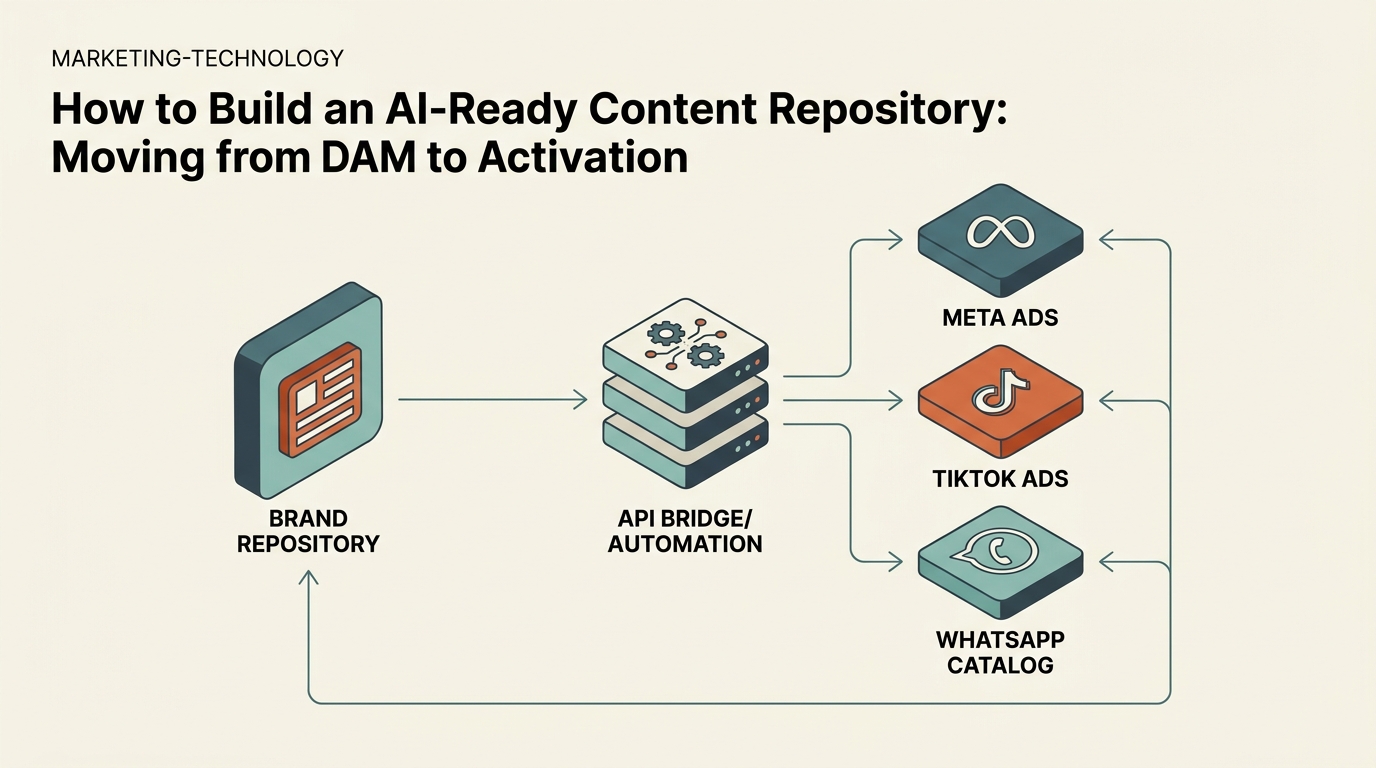
An AI-ready repository is not a destination; it's a node in a network. If your creative team has to manually download a file from the DAM and then manually upload it to TikTok Ads Manager, the chain is broken. Activation is the process of moving assets from storage to the end platform via automated pipelines.
We are seeing this shift in how platforms like WhatsApp are integrating into daily life, as Meta recently detailed in their July 2026 feature update. As messaging and social commerce become more integrated, the 'path to purchase' is getting shorter. Your assets need to be ready to populate a WhatsApp catalog or a Reels ad instantly.
What to do: Map out your 'Activation Path.' Use tools like Zapier, Make.com, or custom API scripts to connect your DAM to your primary ad platforms.
- Set up a 'Trigger' (e.g., a file is moved to a folder labeled 'Approved for Meta').
- Define the 'Action' (e.g., the file is sent to the Meta Media Library with its metadata attached as alt-text).
- Ensure the 'Feedback Loop' is closed (e.g., the DAM receives a tag back from the ad platform indicating the asset's spend or performance).
Why it matters: Speed is a competitive advantage. If a trend breaks on TikTok, an AI-ready repository allows you to identify relevant 'atomic' assets, run them through an AI video editor to add trending audio, and deploy them to the ad manager in minutes rather than days. This is the 'studio quality at speed' promise that modern AI editors are finally delivering.
Common Pitfall: Building 'walled gardens.' Avoid DAM solutions that don't offer a robust, open API. If you can't get your data out easily, you are stuck in a legacy workflow.
Step 4: Integrate Performance Feedback into the Asset Record
Most brand repositories are blind to how their assets actually perform. To be truly AI-ready, the repository needs to 'learn.' This involves pulling performance data from the ad platforms back into the DAM, creating a 'living' record for every asset.
This is where the distinction between a librarian and a strategist happens. A librarian knows where the file is; a strategist knows that 'Clip_A' has a 40% higher click-through rate (CTR) with Gen Z audiences than 'Clip_B.' When you use AI to generate new creative, you want it to prioritize the elements that are proven to work.
What to do: Create a 'Performance' field in your metadata schema. Use an automated script to update this field weekly with data from your ad accounts. Key metrics to sync include:
- Thumb-stop rate (3-second views / impressions)
- Conversion rate per creative element
- Audience sentiment (if using social listening tools like Brandwatch)
- Frequency fatigue indicators
Why it matters: Generative AI tools are only as good as their prompts. An AI-ready repository allows you to generate prompts based on data. Instead of saying 'Make a video for a jacket,' you can say 'Make a video using the background from Asset_123 and the product shot from Asset_456, because this combination has the highest ROAS for our 18-24 demographic.'
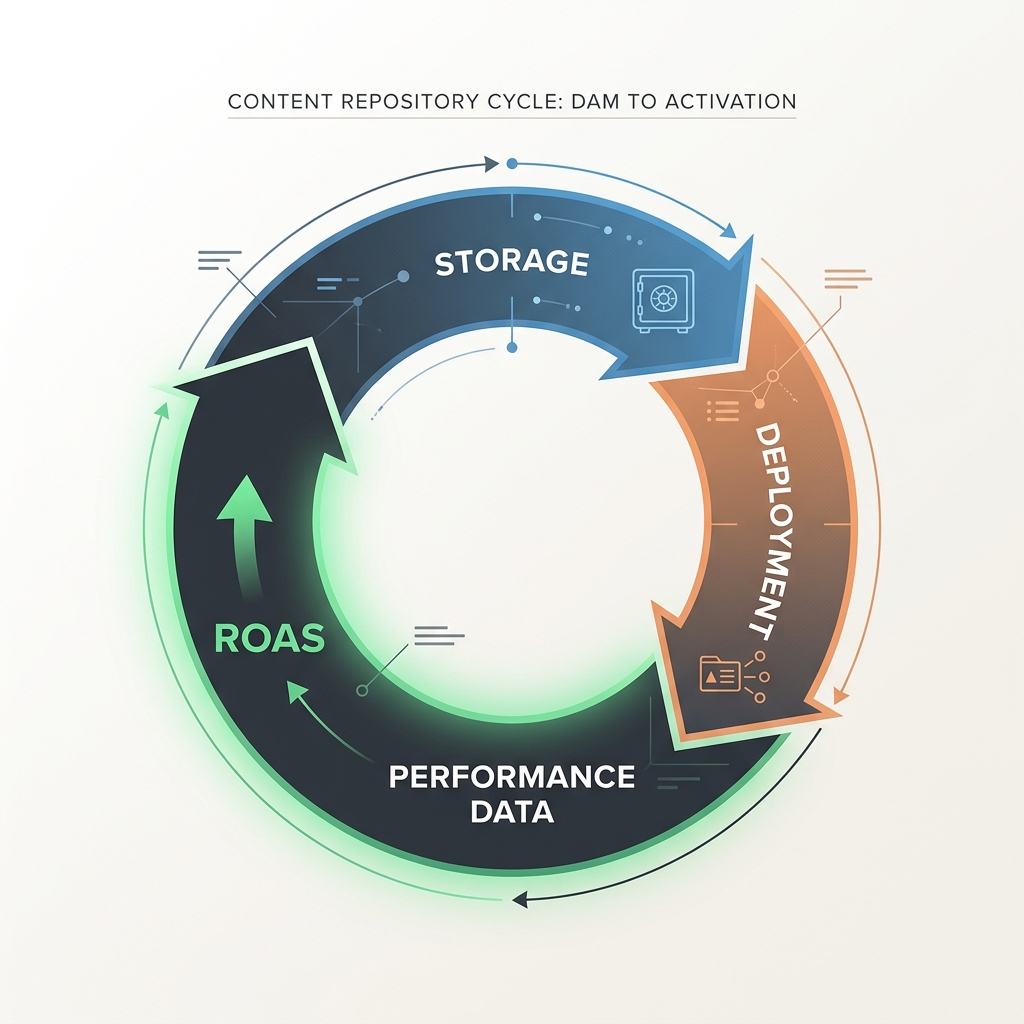
Common Pitfall: Focusing on 'Vanity Metrics.' Don't clutter your DAM with likes or shares. Focus on the metrics that drive business outcomes, like Customer Acquisition Cost (CAC) and Return on Ad Spend (ROAS), to ensure the AI is learning the right lessons.
Step 5: Verification — The 'Zero-Human' Test
How do you know if your repository is actually AI-ready? You run the 'Zero-Human' test. This is the final verification step to ensure your structure, metadata, and pipelines are functioning as a cohesive system.
What to do:
- The Retrieval Test: Ask an AI agent (like a custom GPT connected to your file system) to 'Find all raw video clips featuring Lamine Yamal that are licensed for use in the UK and have a 16:9 aspect ratio.' If the AI returns the correct files in seconds, your metadata is working.
- The Generation Test: Use an AI video tool to create a 15-second ad using only the assets in a specific 'Approved' folder. If the tool can produce a coherent ad without you having to manually fix labels or transparency, your 'atomic' strategy is successful.
- The Deployment Test: Move a new asset into your 'Activation' folder and verify that it appears in your Meta or TikTok Media Library within 5 minutes, complete with its tags.
Why it matters: If any of these steps require a human to 'clean up' the data or 'fix' a file, your repository isn't AI-ready—it's just a slightly faster DAM. True readiness means the machine can handle the heavy lifting, freeing your creative team to focus on high-level strategy and 'The Big Idea.'
Next Steps for Your Creative Workflow
Once you have your AI-ready repository in place, you can begin to layer on more advanced tactics to further distance yourself from the competition:
- Automated Creative Testing: Use your atomic assets to run 'multivariate creative' tests at scale. Instead of testing two finished ads, test five different hooks against three different background tracks to find the winning combination mathematically.
- Dynamic Creative Optimization (DCO) 2.0: Move beyond platform-native DCO. Use your repository to feed custom-built AI models that generate personalized video overlays for different customer segments in real-time.
- Predictive Asset Tagging: Implement AI models that analyze your historical performance data to 'predict' the success of a new asset the moment it's uploaded to the DAM, allowing you to kill underperforming creative before a single cent is spent on distribution.
By moving from a static DAM to an active, AI-ready repository, you aren't just organizing files. You are building a competitive engine that turns brand equity into performance evidence. The platforms are ready for this transition; the question is whether your infrastructure is.
FAQ