Your customers are talking to you, but they aren't using your support tickets. They are venting in Reddit threads, complaining in TikTok comments, and tagging your brand in frustrated X posts. Traditional Net Promoter Score (NPS) surveys and CSAT emails suffer from a massive selection bias: you only hear from the delighted or the enraged. The middle 80%—the people encountering friction that makes them quietly churn—are invisible to your CRM.
By the end of this guide, you will have a repeatable framework for conducting a social intelligence audit. This isn't about counting mentions or tracking sentiment scores. It is about identifying specific UX failures, feature gaps, and navigational friction points that are costing you revenue.
Before you start, you will need access to a social listening tool with historical data capabilities (such as Sprout Social, Brandwatch, or Meltwater) and a basic map of your current customer journey stages.
Step 1: Define the 'Friction Vocabulary' for Your Listening Queries
Most social listening setups are too broad. If you only track your brand name, you'll get drowned in PR mentions and customer service 'where is my order' queries. To find UX insights, you must build a query focused on struggle.
Start by listing the verbs and nouns associated with frustration in your specific industry. If you are a SaaS company, look for terms like 'login loop,' 'can't find the button,' 'reset password not working,' or 'slow load.' If you are in e-commerce, focus on 'cart error,' 'discount code not applying,' or 'checkout spinning.'
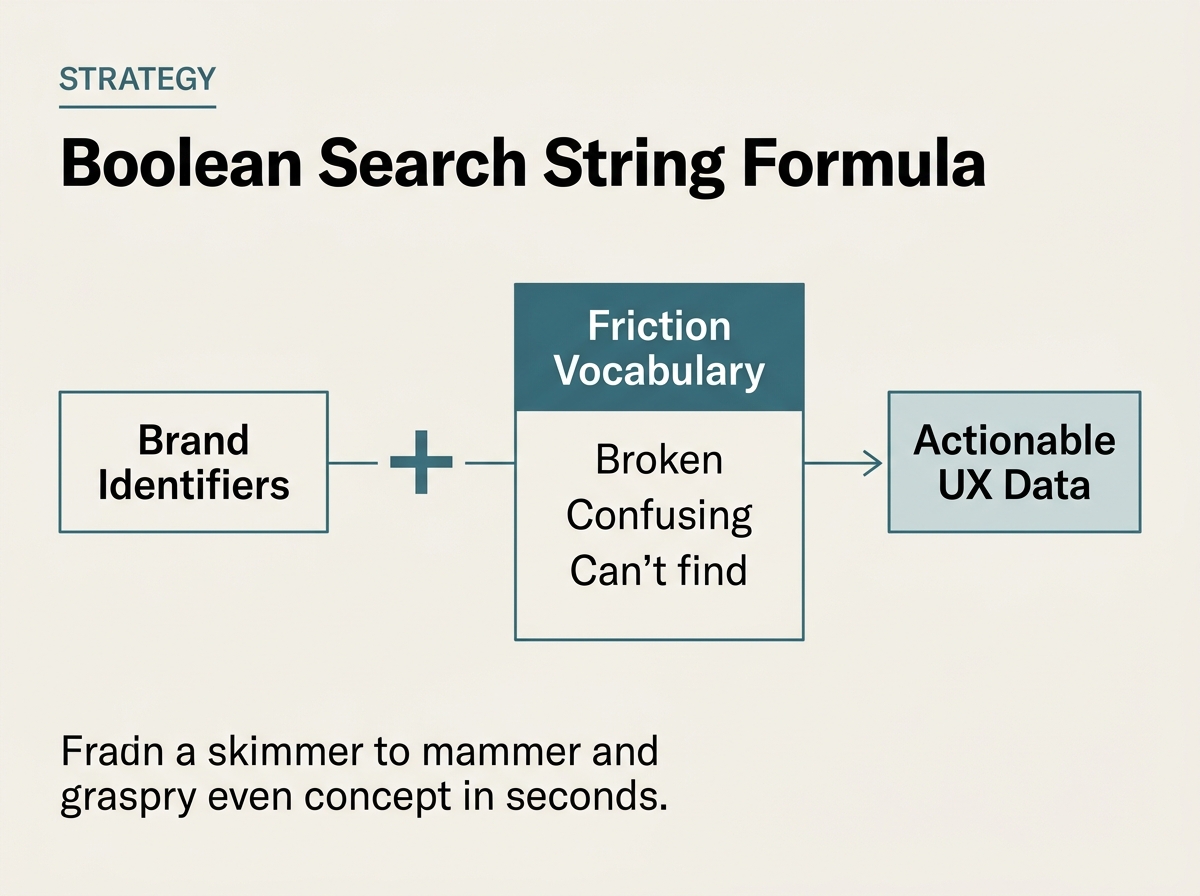
In your listening tool, create a Boolean query that combines your brand name with these friction terms. For example: (BrandName OR "Brand Name") AND (broken OR annoying OR "doesn't work" OR "how do I" OR "can't find" OR "confusing").
Why it matters: This filters out the 'noise' of general brand awareness and focuses your attention on the moments where the product experience fails the user. It moves social media from a megaphone for marketing into a microscope for product development.
Common Pitfall: Using only negative sentiment filters. Sentiment analysis is notoriously bad at catching sarcasm or technical frustration. A user saying "I love how this app crashes every time I open it" might be tagged as 'positive' by a basic algorithm. Use keyword-based filtering instead.
Step 2: Map Mentions to the Customer Journey Stages
Once you have your raw data, you need to categorize it. A list of 500 complaints is useless; a report showing that 40% of complaints happen during the 'Onboarding' phase is actionable.
Create a tagging structure in your social listening tool that aligns with your internal customer journey map. Common stages include:
- Discovery/Research: Users asking questions about features before buying.
- Onboarding/Setup: Users struggling with the initial account creation or installation.
- Core Usage: Issues with the primary value proposition of the product.
- Retention/Support: Complaints about billing, cancellations, or slow support response.
Take your filtered mentions from Step 1 and apply these tags. If you use Sprout Social’s Smart Inbox or Tagging features, you can automate much of this after an initial manual training period.
Why it matters: This allows you to see where the 'leaky bucket' is. If most social venting happens during onboarding, your UX team needs to look at the first-run experience, not the long-term feature set. How to align social data with product roadmaps
Common Pitfall: Over-categorizing. Don't create 20 different tags. Stick to 4-6 broad stages to keep the data statistically significant.
Step 3: Identify 'Ghost Features' and Feature Gaps
One of the most valuable outputs of a social intelligence audit is identifying 'Ghost Features'—things your customers think you have, or things they are desperately trying to do but can't.
Look for clusters of mentions where users are asking 'How do I...' or saying 'I wish [Brand] did...'. Often, you will find that a feature actually exists, but the UX is so poor that users can't find it. This is a navigation failure. Alternatively, you may find a consistent request for a feature that your competitors have, providing immediate ammunition for your product roadmap.
During this step, look for mentions of competitors. Use a query like (BrandName) AND (CompetitorName) AND (better OR missing OR has). This competitive social intelligence reveals exactly where your UX is falling behind in the market.
Why it matters: It bridges the gap between what you think you built and how it is actually being used. As we saw with the recent Buffer 'Build Week' initiative [S1], internal teams often have to pivot quickly to build what is actually needed rather than what was planned months ago.
Common Pitfall: Ignoring the 'silent' requests. Sometimes a lack of mentions about a specific new feature is just as telling as a flood of complaints—it means nobody is using it.

Step 4: Quantify the Volume vs. Impact Matrix
Not all social complaints are created equal. A single viral tweet from a high-authority account can be more damaging than 50 isolated comments on a niche forum. However, for UX improvement, we are looking for patterns, not just outliers.
Create a simple 2x2 matrix:
- High Volume / High Impact: Critical bugs or major UX flaws affecting many users (e.g., checkout is broken on Safari).
- Low Volume / High Impact: Niche but devastating issues (e.g., accessibility tools not working for visually impaired users).
- High Volume / Low Impact: Minor annoyances that are frequently mentioned (e.g., a 'dark mode' that isn't dark enough).
- Low Volume / Low Impact: One-off personal preferences.
Use your social listening tool's 'Reach' or 'Impact' metrics to help weight these. If a complaint comes from a user with 50,000 followers, the 'Impact' score goes up because of the brand risk, even if the 'Volume' is low.
Why it matters: You cannot fix everything at once. This matrix helps you justify your UX priorities to stakeholders and C-suite executives who might otherwise only care about the latest viral complaint. [INTERNAL: Communicating social ROI to the C-suite -> social-roi-reporting]
Common Pitfall: Reacting solely to the loudest voice. Just because one influencer complained doesn't mean that's the most important UX fix for your broader user base.
Step 5: The Verification and Loopback Process
How do you know if your audit actually led to an improvement? You must set a baseline before the UX changes are implemented and track the delta afterward.
After the product or UX team ships a fix based on your audit, monitor the specific 'Friction Vocabulary' keywords you identified in Step 1. You should see a statistically significant drop in the volume of those specific complaints relative to your total brand mentions.
Ideally, you want to see a 'Sentiment Flip.' This happens when users who previously complained about a feature start posting about how the update fixed their problem. These 'gratitude mentions' are the ultimate proof of a successful social intelligence loop.
Why it matters: This closes the loop between marketing, social, and product. It proves that social media is a business intelligence tool, not just a distribution channel. As Kim Sizemore's move to Finn Partners suggests [S2], the integration of media and data is becoming the new standard for agency and brand success.
Common Pitfall: Not accounting for seasonality. If you ship a fix during a major sale (like Black Friday), your complaint volume might go up simply because you have 10x more users, even if the UX is better. Always look at the rate of complaints per 1,000 mentions, not just the raw number.
Three Related Tactics to Try Next
Once you have mastered the basic social intelligence audit, you can expand your practice with these advanced tactics:
- Predictive Friction Mapping: Use AI-driven trend analysis in tools like Brandwatch to identify rising clusters of keywords before they become full-blown crises. By spotting a 5% week-over-week increase in 'login issues,' you can alert the engineering team before the system fails entirely.
- Creator-Led UX Audits: Partner with 'power users' or creators in your space to do 'live audits' of your product on stream or in video. This provides qualitative, long-form UX feedback that standard social listening might miss.
- Cross-Channel Correlation: Export your social friction data and overlay it with your website's heatmaps (using tools like Hotjar or Microsoft Clarity). If social users are complaining about the checkout, and your heatmaps show a 70% drop-off on the 'Shipping' page, you have found the exact coordinate of the problem.
Social intelligence is no longer just about crisis management or community engagement. It is the most honest, real-time focus group in the world. If you aren't auditing it for UX insights, you are leaving the most valuable data on the table. In an era where AI is increasingly used to generate content [S4], the human insight derived from real customer struggle is your greatest competitive advantage. Accountability in marketing and product development starts with listening to the people who actually use what you build [S5].
FAQ