

Social media managers are tired of being the cleanup crew for bad product launches and the last to hear about shifts in the sales pipeline. You spend your day monitoring the pulse of the market, yet your insights often die in a monthly PDF report that no one in the C-suite actually reads. It is time to break the cycle. By the end of this guide, you will have a repeatable framework for moving social data out of your dashboard and directly into the tools your product and sales teams use every day—specifically Salesforce, HubSpot, and Jira.
To get started, you will need admin-level access to your social listening platform (Sprout Social, Sprinklr, or Brandwatch), a seat in your organization's CRM, and a clear line of communication with a lead in either the Sales Ops or Product Management department. We aren't just looking for engagement metrics; we are looking for signals that change how your company builds and sells.
TL;DR
- Stop Reporting, Start Routing: Move from static reports to automated data triggers in CRM and PM tools.
- Sales Enablement: Tag 'intent to buy' signals in social listening and push them to Salesforce leads.
- Product R&D: Use feature-request sentiment to populate Jira backlogs directly from social mentions.
- Attribution: Close the loop by linking social profile IDs to customer records to prove long-term LTV.
Step 1: Audit Your Social Listening for 'High-Intent' Signal Categories
Before you can export data, you have to clean it. Most social listening feeds are 90% noise. If you dump a raw feed of every brand mention into your sales team's CRM, they will revoke your API access by Friday. You need to create specific 'high-intent' folders or tags within your listening tool.
Start by defining what a 'Sales Signal' looks like versus a 'Product Signal.' A sales signal is a user asking about pricing, comparing you to a competitor, or complaining about a contract renewal with a rival. A product signal is a specific pain point—like a user frustrated that your app doesn't have a dark mode or a specific integration. In Sprout Social, use the 'Inbox Macro' feature to categorize these. In Sprinklr, leverage 'AI Smart Themes' to automatically bucket these conversations.
Why it matters: Sales and Product teams don't care about your 'reach' or 'impressions.' They care about 'leads' and 'friction.' By filtering for intent, you are speaking their language. You are no longer the 'Twitter person'; you are a source of market intelligence. According to recent industry shifts, like those seen in the lead-up to the 2026 World Cup where CPMs are hitting record highs per Adweek [S1], the cost of acquiring a customer through traditional ads is skyrocketing. Organic social data that identifies intent is a high-value, low-cost alternative to expensive lead-gen campaigns.
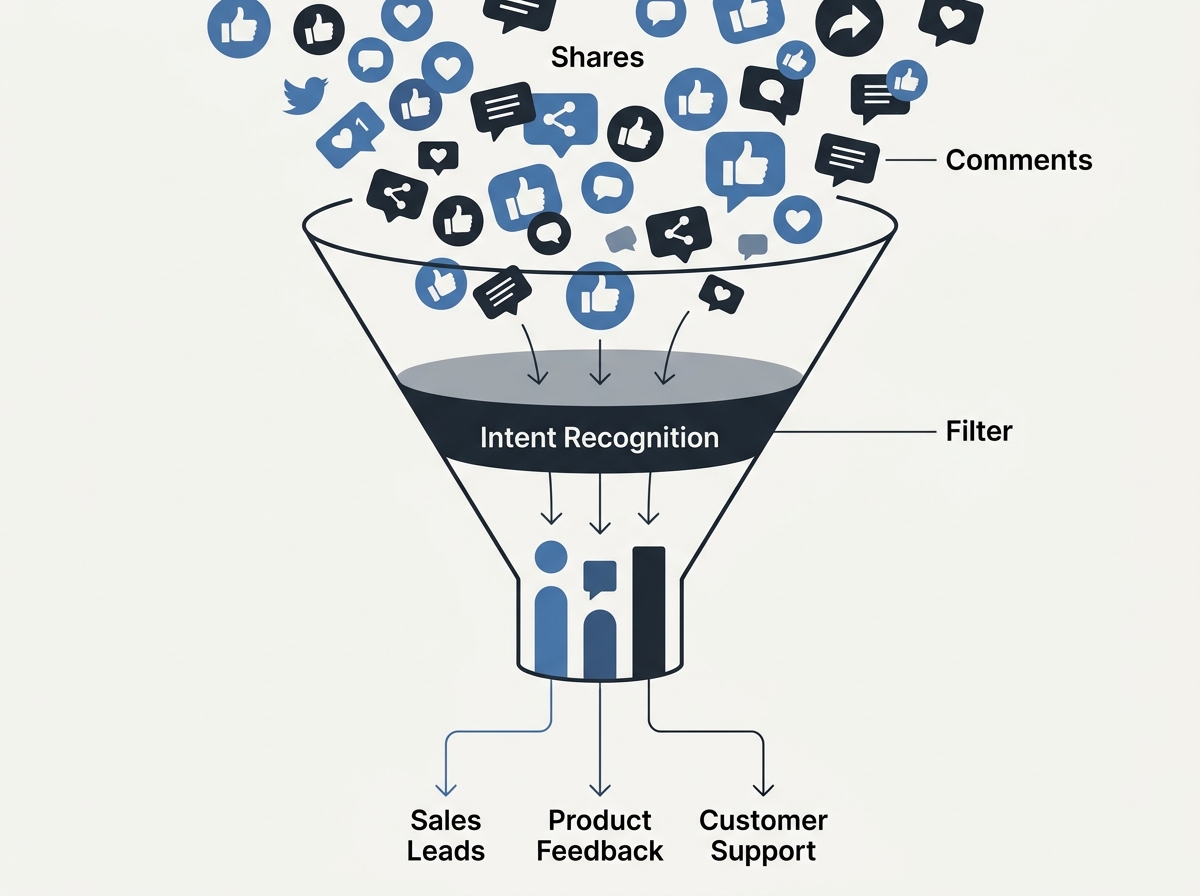
Common Pitfall: Over-tagging. Don't try to capture everything. If you send 50 'leads' to Sales and 48 of them are just people saying 'cool pic,' you've lost your credibility. Start with a 95% confidence interval for intent.
Step 2: Bridge the Gap with CRM Integration and Lead Mapping
The most common marketing silo is the gap between the Social Inbox and the CRM. Most premium social tools have native integrations with Salesforce or HubSpot, but they are rarely configured correctly. You don't just want to see CRM data in your social tool; you want to push social activity into the CRM.
Go into your Sprout Social or Sprinklr settings and locate the Salesforce integration. You need to map social 'Profiles' to CRM 'Leads' or 'Contacts.' When a user engages with your brand on X or LinkedIn, your social team should be able to click a button that says 'Create Lead in Salesforce.' This should automatically carry over the user's bio, their public-facing location, and the specific text of their inquiry.
This is particularly vital as platforms like Instagram move away from the 'link in bio' workaround [S4], making direct social interaction a more primary path for conversion. If the link in bio dies, the direct message and public comment become the new storefront. If that storefront isn't connected to your CRM, you're losing data every hour.
Why it matters: This creates a 'Social History' on the lead record. When a sales rep calls a prospect, they can see that the prospect asked about a specific feature on LinkedIn three days ago. That is the difference between a cold call and a warm, informed outreach. WPP’s recent bounceback in new business [S2] suggests that agencies and brands that can prove integrated value are the ones winning in a tightening market.
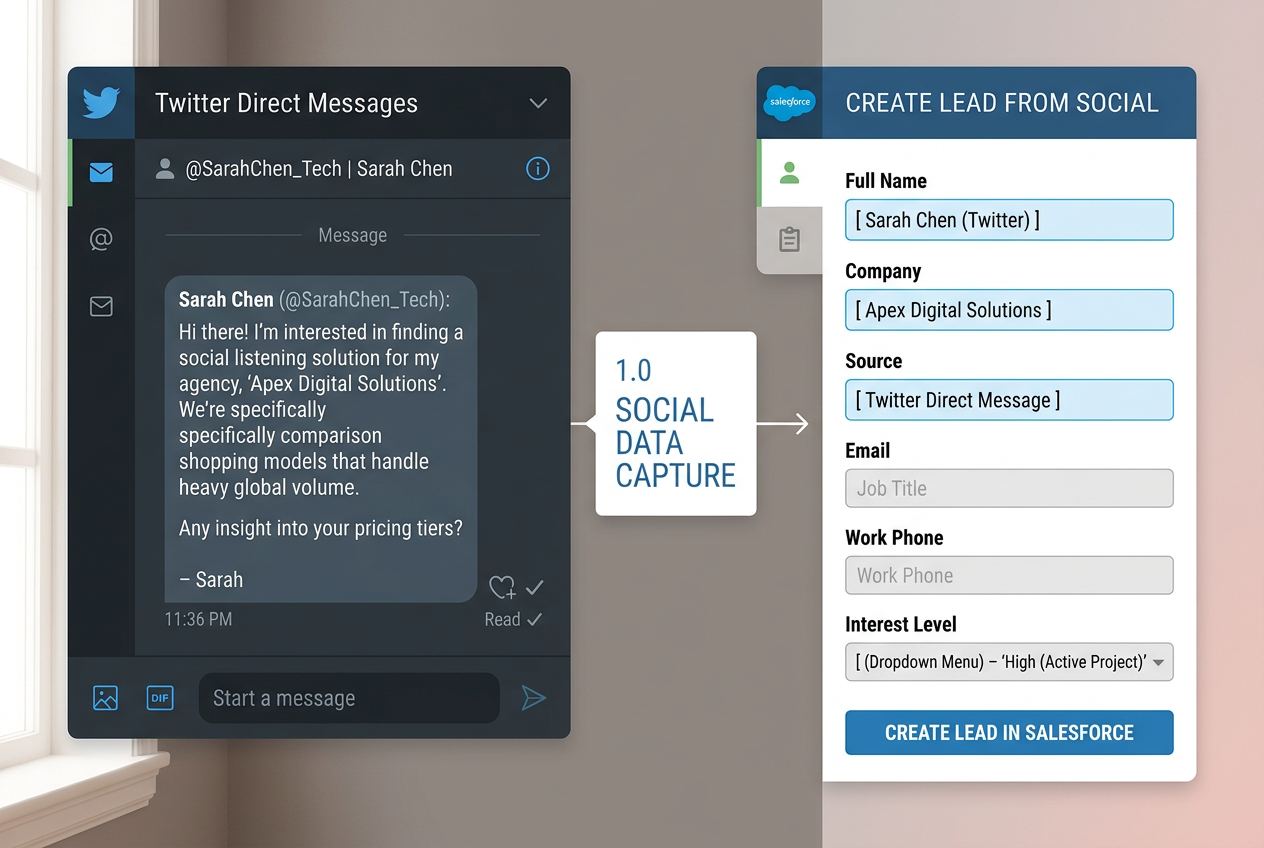
Common Pitfall: Creating duplicate records. Ensure your integration is set to 'Match by Email' if possible, or 'Match by Handle.' If you don't have a deduplication strategy, your CRM admin will shut you down for cluttering the database.
Step 3: Automate Product Feedback Loops into Jira or Asana
Product managers live in Jira. They do not live in your social analytics dashboard. To get social data into the product workflow, you must meet them where they work. Most social listening tools allow for 'Webhook' exports or have direct integrations with project management software.
Set up a 'Product Feedback' tag in your social listening tool. Whenever a user mentions a bug or a feature request, tag it. Then, use a tool like Zapier or the native Sprinklr-Jira connector to create a 'Ticket' or 'Issue' whenever that tag is applied. The ticket should include the original social post URL, the sentiment score, and the user's follower count (to help PMs prioritize high-impact issues).
This is essential for maintaining brand health. As Polly Hudson noted in The Guardian regarding the 'hellish portal' of social algorithms [S3], negative sentiment can spiral quickly. If a product bug is trending, and it takes three days for the social manager to email the product manager, the brand damage is already done. Automated tickets reduce that lag to seconds.
Why it matters: It turns social media into a real-time UAT (User Acceptance Testing) environment. You are providing the Product team with a constant stream of 'Voice of Customer' data without them having to run a single focus group. This is especially useful when targeting older demographics [S5], who may be more vocal about UX frustrations on platforms like Facebook.
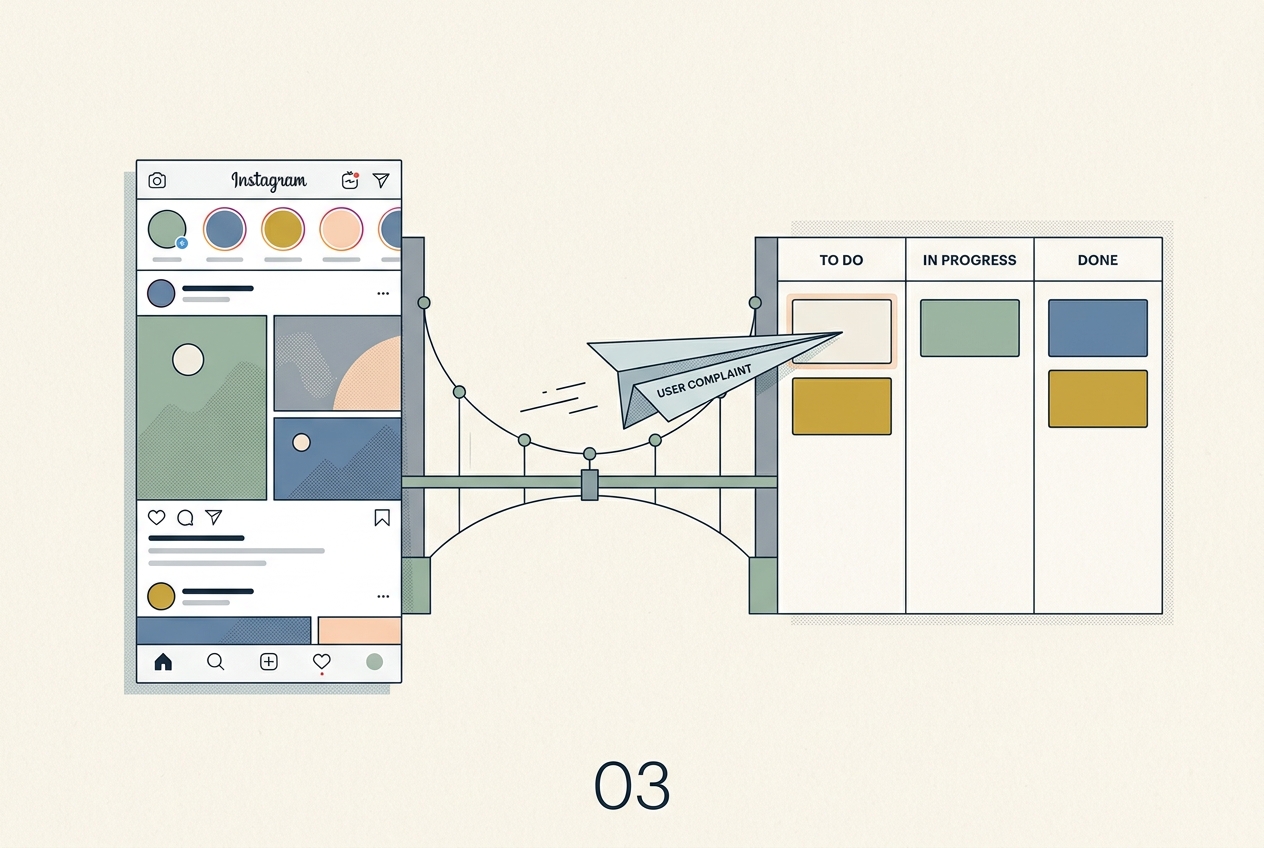
Common Pitfall: Sending every complaint to Jira. Only send 'Validated' feedback. If one person hates the color of your logo, that's a comment. If fifty people say the 'Checkout' button is broken on Safari, that's a Jira ticket.
Step 4: Build a Cross-Functional 'Social Intelligence' Dashboard
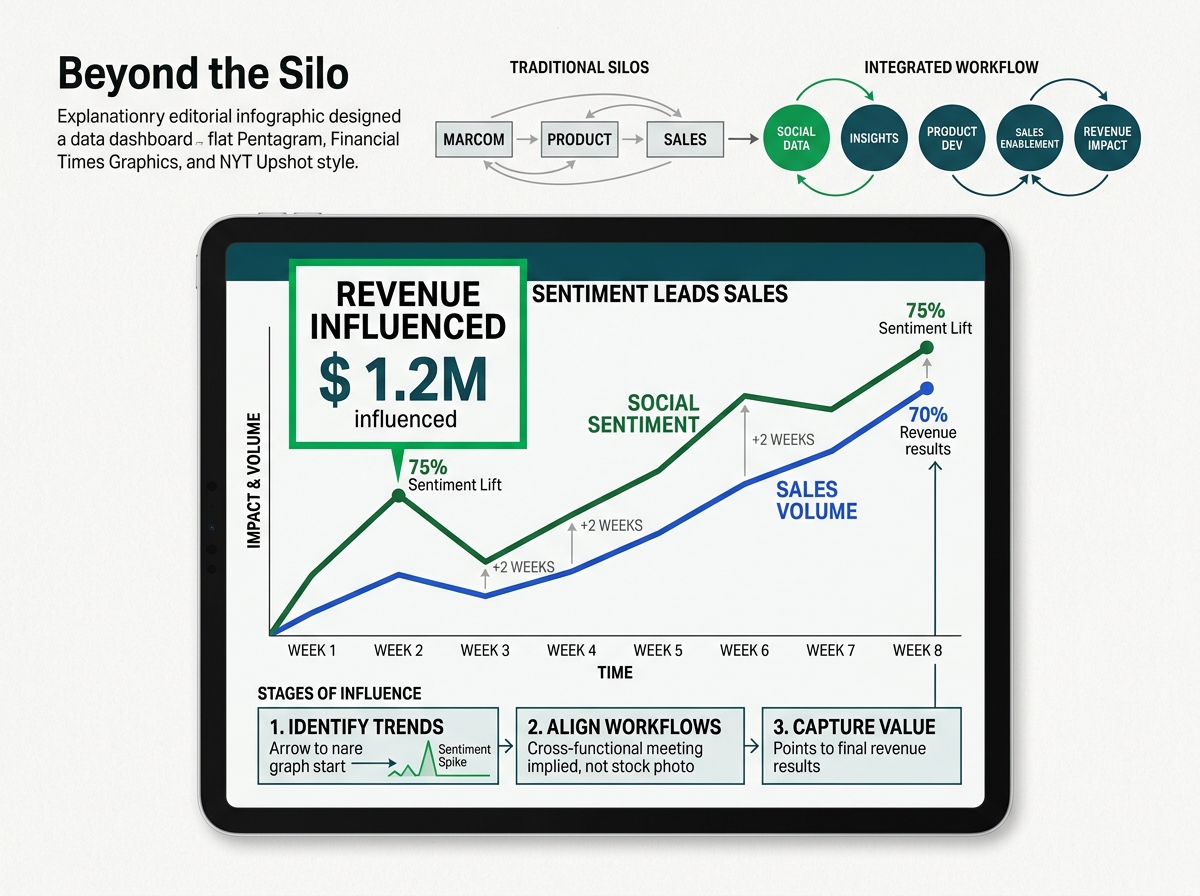
Once the data is flowing, you need a way to visualize the impact. A standard social report shows 'Top Posts.' A Social Intelligence dashboard shows 'Revenue Influenced' and 'Product Issues Resolved.'
Use a tool like Tableau, Power BI, or even Sprout’s 'Tableau Integration' to merge social data with sales data. You want to show a chart that has two lines: 'Social Mentions of Feature X' and 'Sales Pipeline for Feature X.' When those lines move in tandem, you’ve proven that social sentiment is a leading indicator of sales performance.
This level of reporting is what moves a Social Media Manager into a Director of Strategy role. You are no longer talking about 'likes'; you are talking about the business's health. With the 2026 World Cup on the horizon and massive sponsorship spends expected [S1], being able to correlate social buzz with actual sales lift will be the only way to justify those high-stakes budgets.
Why it matters: It provides a single source of truth. When the VP of Sales asks why their numbers are down, you can point to a 40% increase in negative social sentiment regarding a recent pricing change. You are providing the 'Why' behind the 'What.'
Common Pitfall: Making the dashboard too complex. Keep it to three main KPIs: Social Leads Generated, Social-to-Jira Tickets Resolved, and Share of Voice vs. Top 3 Competitors.
Step 5: Establish the 'Feedback Verification' Protocol
The final step is ensuring the loop actually stays closed. Every two weeks, hold a 15-minute 'Social Sync' with a representative from Sales and Product. In this meeting, you don't look at tweets; you look at the CRM and Jira records you created.
Ask the Sales rep: 'Did that LinkedIn lead from Tuesday result in a meeting?' Ask the Product manager: 'Was that bug report from the Instagram comments helpful for the last sprint?' Use their feedback to refine your tagging in Step 1. If the leads were low quality, tighten your filters. If the product feedback was too vague, start asking follow-up questions to users on social before you create the ticket.
Verification of success looks like this:
- Sales: A closed-won deal in your CRM has 'Social' listed as a primary or secondary touchpoint in the activity history.
- Product: A release note for a new app update specifically cites 'user feedback' that originated from your social listening tags.
- Executive: The social team is invited to quarterly planning sessions, not just to 'promote the plan,' but to help inform it.
Three Related Tactics to Try Next
- Competitor Defection Campaigns: Set up a listening stream for your competitor's 'Help' handle. When their users complain about downtime, use your CRM integration to alert a sales rep to reach out with a 'switch and save' offer.
- Executive Thought Leadership Attribution: Track the LinkedIn profiles of your C-suite. Use your CRM to see if prospects who engage with the CEO's posts have a higher win rate or shorter sales cycle than those who don't.
- Social-First FAQ Updates: Identify the top 5 questions asked in your DMs over a month. Send these directly to your SEO and Content teams to update the website's FAQ page, ensuring you're capturing search intent based on real social queries.
FAQ