Manual content ideation is a bottleneck that kills brand momentum. You spend hours scouring Slack channels, Discord threads, and subreddits for 'what people are talking about,' only to spend another three hours drafting posts that might not even resonate. By the time your content hits the feed, the conversation has moved on.
In this guide, we are moving beyond basic scheduling. We are building a self-sustaining social content engine. By the end of this tutorial, you will have a functional architecture that monitors community signals in Slack, processes them through a logic layer, and queues them for distribution via the Buffer API. This isn't just about saving time; it's about shifting to a community-led growth model where your social presence is a direct reflection of your customer's current pain points.
Prerequisites for this build:
- A Buffer Business or Premium account (for API access).
- A Slack Workspace with Admin privileges to create an App.
- A basic understanding of Python or a no-code middleware like Zapier/Make (we will focus on the architectural logic).
- A dedicated 'Content-Ideas' channel in your community platform.
1. Establishing the Community Signal Layer (Slack Setup)
The first step in a content pipeline isn't writing; it's listening. Most brands treat community management and social media as two separate silos. We are going to bridge them. We need to capture high-intent questions—the kind that indicate a user is struggling with a concept or looking for a specific solution.
You'll start by creating a Slack App within your workspace. Navigate to the Slack API dashboard and create a new app from scratch. Under 'Event Subscriptions,' you want to enable events and subscribe to message.channels. This allows your pipeline to 'hear' when a new message is posted in a specific channel.
Why it matters: According to recent industry shifts toward Generative Experience Optimization (GEO), platforms are increasingly prioritizing content that answers specific, high-intent user queries (per Search Engine Land's July 2026 analysis of AI search trends). By pulling directly from your community, you ensure your social content is pre-validated by real humans.
Common Pitfall:
Connecting your pipeline to a general 'lounge' channel. This will result in high-volume, low-quality noise. Create a specific #ask-the-expert or #product-feedback channel where the signal-to-noise ratio is high. If you try to automate from a general chat, your Buffer queue will fill with 'Good morning' posts and memes.
2. Configuring the Buffer API for Programmatic Distribution
Buffer's API is the workhorse of this operation. While most social managers use the web interface, the API allows you to bypass the UI entirely. You need to create a 'Buffer App' in the Buffer Developer portal to receive your access_token.
Once you have your token, you'll need to identify your profile_ids. These are the unique identifiers for your LinkedIn, X, or Threads accounts. A simple GET request to https://api.bufferapp.com/1/profiles.json will return a list of every account connected to your Buffer dashboard. Save these IDs; your script will need them to know where to send the data.
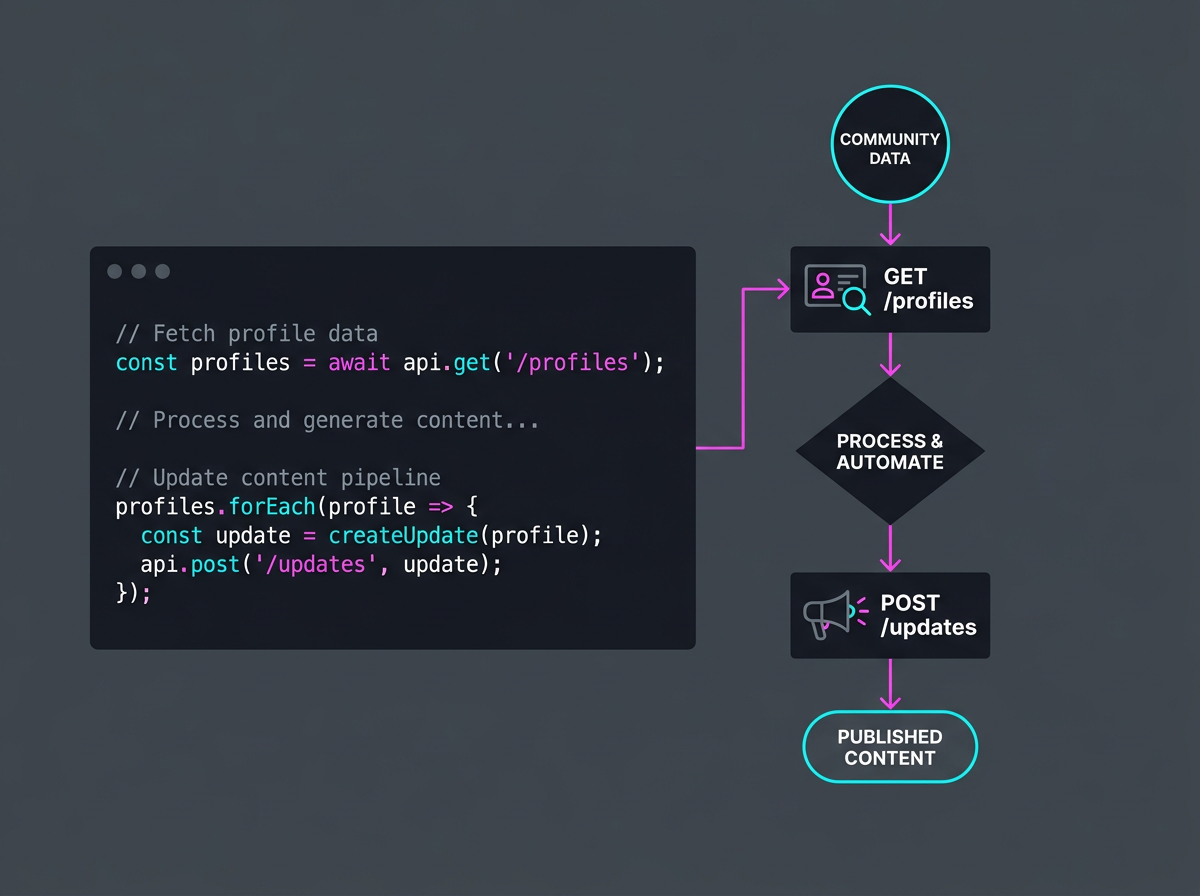
Why it matters: Programmatic posting allows for 'Just-in-Time' content. If a specific technical question is trending in your Slack community at 10:00 AM, your pipeline can have a drafted response in the Buffer queue by 10:05 AM. This speed is critical for platforms like Bluesky, where community-first feeds reward rapid, relevant participation (as noted in Sprout Social’s July 2026 Bluesky strategy guide).
Common Pitfall: Hardcoding a single profile ID. If you ever disconnect and reconnect an account, the ID might change. Build a configuration file or environment variables to manage these IDs so you don't have to rewrite your core logic every time you update your social portfolio.
3. Building the Logic Layer: From Raw Text to Social Post
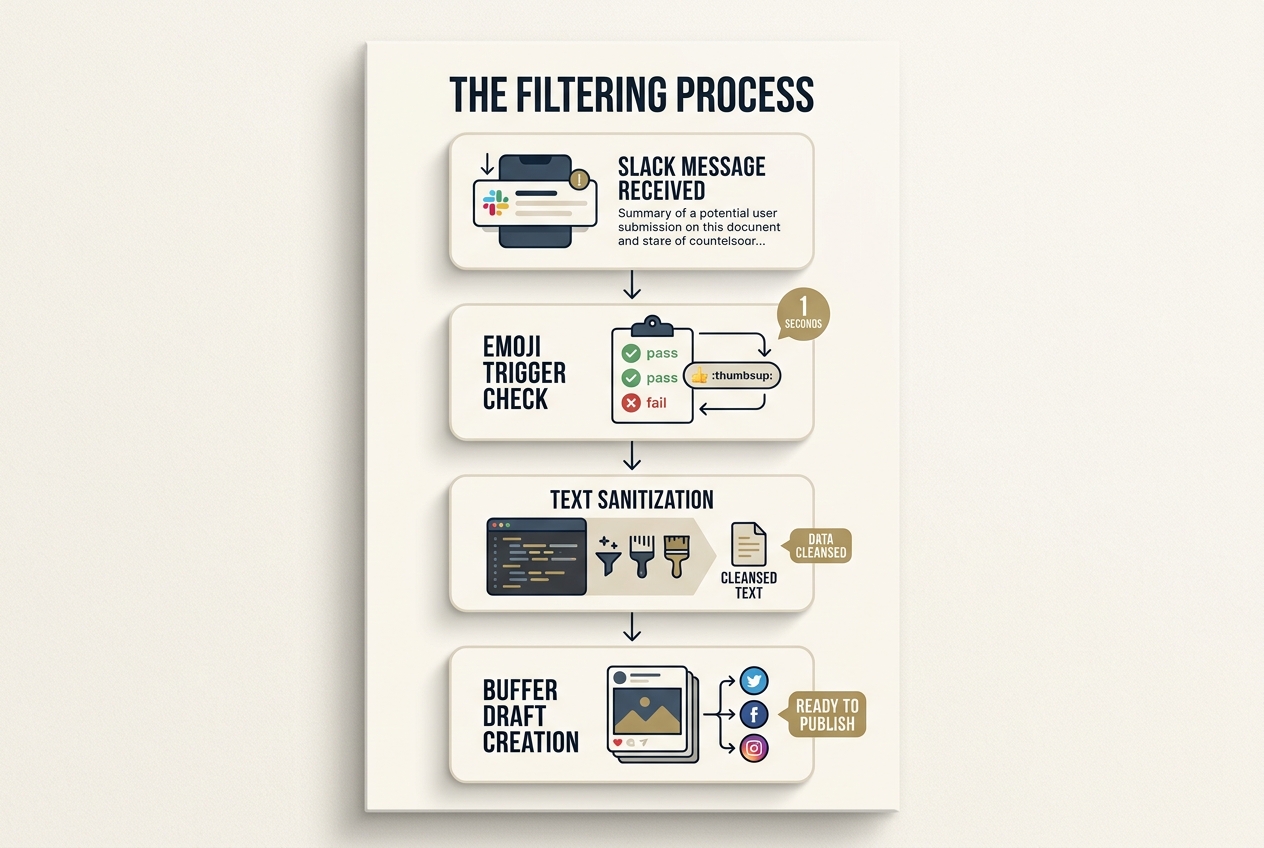
This is where the 'magic' happens. You don't want every Slack message to become a post. You need a filter. Your middleware (Python script or Make.com scenario) should look for specific triggers.
For example, use a 'Reacjiloji' trigger. Only messages that receive a specific emoji (like a 💡 or a 🚀) from a team member get pushed to the next stage. Once a message is triggered, the logic layer should:
- Clean the text: Remove Slack-specific formatting like
<@UserIDs>. - Format for Social: Add relevant hashtags and a call-to-action (CTA).
- Check for Length: Ensure the content fits the character limits of the target platform (e.g., 280 for X, 300 for Bluesky).
# Example logic snippet
if 'question' in slack_message.text.lower():
    post_content = f"Community Question: {slack_message.text} \n\nJoin the conversation in our Slack! #CommunityGrowth"
    buffer_client.create_update(content=post_content, profile_ids=[linkedin_id])
Why it matters: Automation without a logic layer is just spam. By requiring a manual emoji trigger, you maintain editorial control while automating the tedious work of copying, pasting, and formatting. It’s the 'Human-in-the-loop' model that modern marketing leads, like those at MLS (per Adweek’s July 2026 coverage), are using to scale coordinated campaigns across massive footprints.
Common Pitfall:
Ignoring link metadata. If the Slack message contains a link, the Buffer API handles it differently than plain text. Ensure your logic layer explicitly parses URLs into the media[link] parameter of the Buffer API call to ensure rich previews generate correctly.
4. Setting Up the Feedback Loop and Approval Workflow
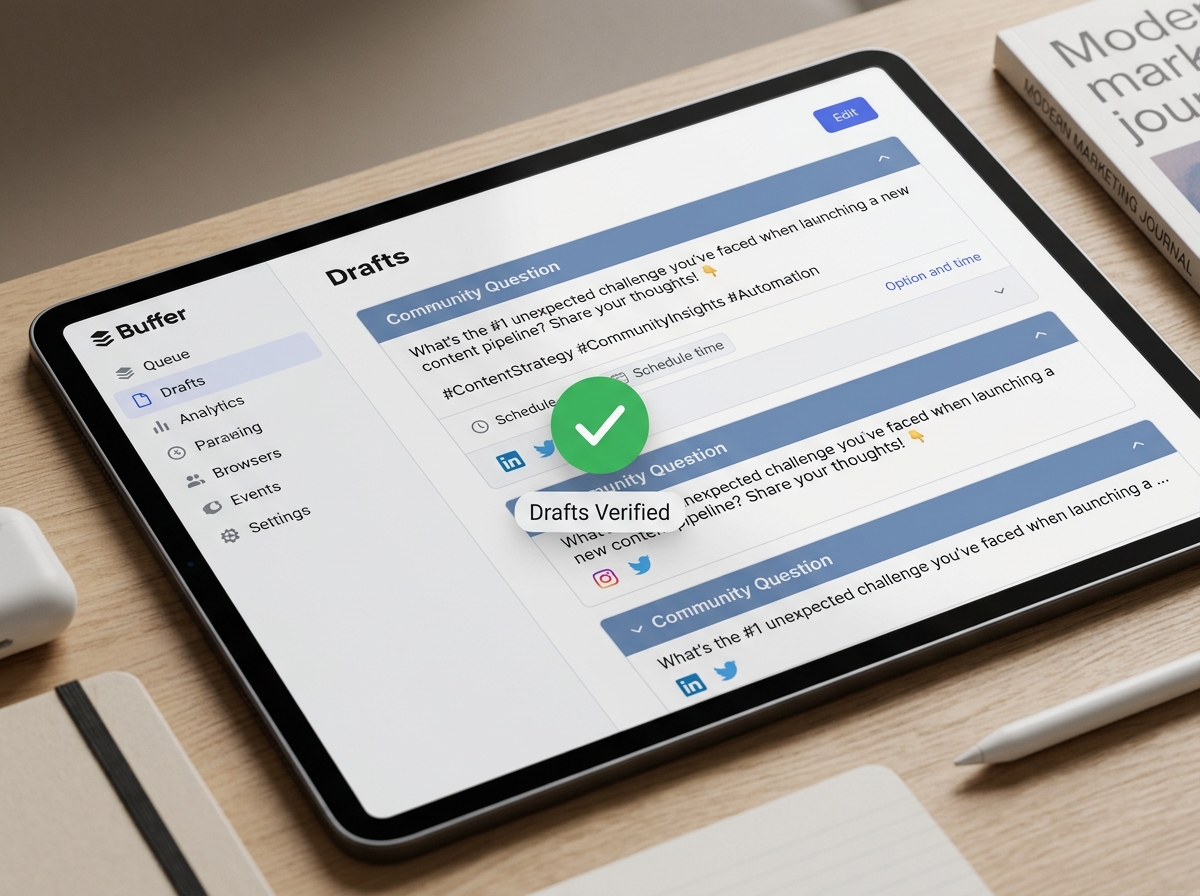
Never set your pipeline to 'Auto-Post' directly to live feeds. Instead, use Buffer's pending status. When your script sends data to the Buffer API, set the shorten parameter to false and ensure the post lands in the 'Drafts' or 'Pending' queue.
This allows your Social Media Manager to do a final 'vibe check' every morning. They can tweak the tone, swap an image, or reschedule the post for a peak engagement window based on historical performance data.
Why it matters: Brand safety is paramount. Even the best community data can occasionally include sensitive topics or internal jargon that shouldn't be public. The 'Drafts' queue acts as a fail-safe, ensuring that while the pipeline is automated, the voice remains human.
Common Pitfall: Over-automating the scheduling. If your script sends 50 posts to the queue at once, it can trigger platform spam filters. Use a rate-limiter in your code or spread the requests out over several minutes.
5. Verification: Testing the End-to-End Flow
To verify your pipeline is working, follow this checklist:
- Post a test message in your designated Slack channel.
- Apply the trigger emoji (e.g., the 💡).
- Check your logs: If using Python, ensure the script returns a
200 OKstatus from the Buffer API. - Confirm in Buffer: Open your Buffer dashboard and look for the new draft. It should appear with the correct text, profile selection, and any attached media.
If the post doesn't appear, check your API permissions. The most common error is a 'Scope' mismatch—ensure your Buffer App has buffers:write permissions enabled.
6. Scaling the Engine: Multi-Source Aggregation
Once Slack is working, you can expand. Use the same logic to pull from other community touchpoints.
- Discord: Use Webhooks to pull from 'Help' channels.
- Zendesk/Intercom: Pull common support tickets to create 'How-to' social snippets.
- Google Search Console: Identify rising 'Query' trends and feed them into the pipeline to improve your GEO standing.
As Google's Ginny Marvin recently clarified regarding AI Search and Creator Partnerships (Search Engine Journal, July 2026), the future of discovery relies on 'Qualified Conversions.' Your content pipeline should eventually aim to map community questions to specific conversion events in your CRM.
Three Tactics to Try Next
- Sentiment Triggering: Use a sentiment analysis API (like Google Cloud Natural Language) to automatically flag high-positivity community messages for use as 'Social Proof' posts.
- Automated Image Generation: Integrate the DALL-E or Midjourney API into your logic layer to generate a branded background image for every text-based question, increasing Reels/TikTok visibility.
- Cross-Platform Recycling: Build a logic branch that takes a high-performing LinkedIn post (tracked via Buffer analytics) and automatically reformats it for a Bluesky thread or a Threads post 48 hours later.
By treating your social media as a data engineering problem rather than just a creative one, you build a moat that manual competitors cannot cross. You aren't just posting; you're building a responsive brand organism.
FAQ