Google’s transition from a search engine to an answer engine is complete, and for ecommerce brands, the battlefield has shifted from the SERP to the generative interface. With the full rollout of Google AI Mode in late 2025, the platform now uses Gemini to synthesize ad creative on the fly. You aren't just bidding on keywords anymore; you're bidding on the AI’s ability to reconstruct your product into a persuasive, multi-modal experience.
If your Merchant Center feed is still optimized for 2023 standards, you’re likely seeing 'Frankenstein' ads—AI-generated videos with hallucinated textures or lifestyle images that look like uncanny valley nightmares. The shift to AI Mode means the feed is no longer just a database; it is a training set.
Why it matters: Google’s internal data suggests that AI-generated assets in Performance Max campaigns see a 12% higher conversion rate when feed attributes are fully populated. However, without specific guardrails, Gemini often prioritizes speed over brand voice. By optimizing five specific attributes, you regain control over the visual and textual output of these automated placements.
Key takeaways
- Lifestyle over White-Back: The
[lifestyle_image_link]attribute is now the primary source for Gemini's background synthesis. - Highlight Weighting: The
[product_highlight]field acts as the 'prompt instructions' for AI-generated ad copy and video captions. - Video Feed Priming: Providing raw 9:16 video assets via the feed prevents Google from creating low-quality 'slideshow' videos from static images.
- Contextual Guardrails: New exclusion rules in Merchant Center allow you to prevent Gemini from using specific brand terms in generative headlines.
The Architecture of Google AI Mode Ads
To optimize effectively, you have to understand what Gemini is actually doing when it 'generates' an ad. Unlike traditional Responsive Search Ads (RSAs) that mix and match your headlines, AI Mode uses a process called Semantic Recomposition.
When a user queries something complex like "best sustainable hiking boots for wide feet in rainy weather," Gemini doesn't just pull your product title. It scans your [product_description], [product_highlight], and [lifestyle_image_link]. It then generates a custom 15-second video or a high-fidelity image that places your product in a rainy, mountainous environment.
If you haven't provided a lifestyle image, Gemini will attempt to 'outpaint' your white-background product photo. We’ve seen this result in boots appearing to float in mid-air or, worse, being merged with the background elements. Success in 2026 requires moving away from the 'keyword stuffing' mentality of the mid-2020s. As noted in recent MarTech analysis content briefs for people, the focus must shift to the user's situation. For Google AI Mode, that means providing the 'situational data' the AI needs to build a relevant scene.
1. The Lifestyle Image Link: Gemini’s Visual Foundation
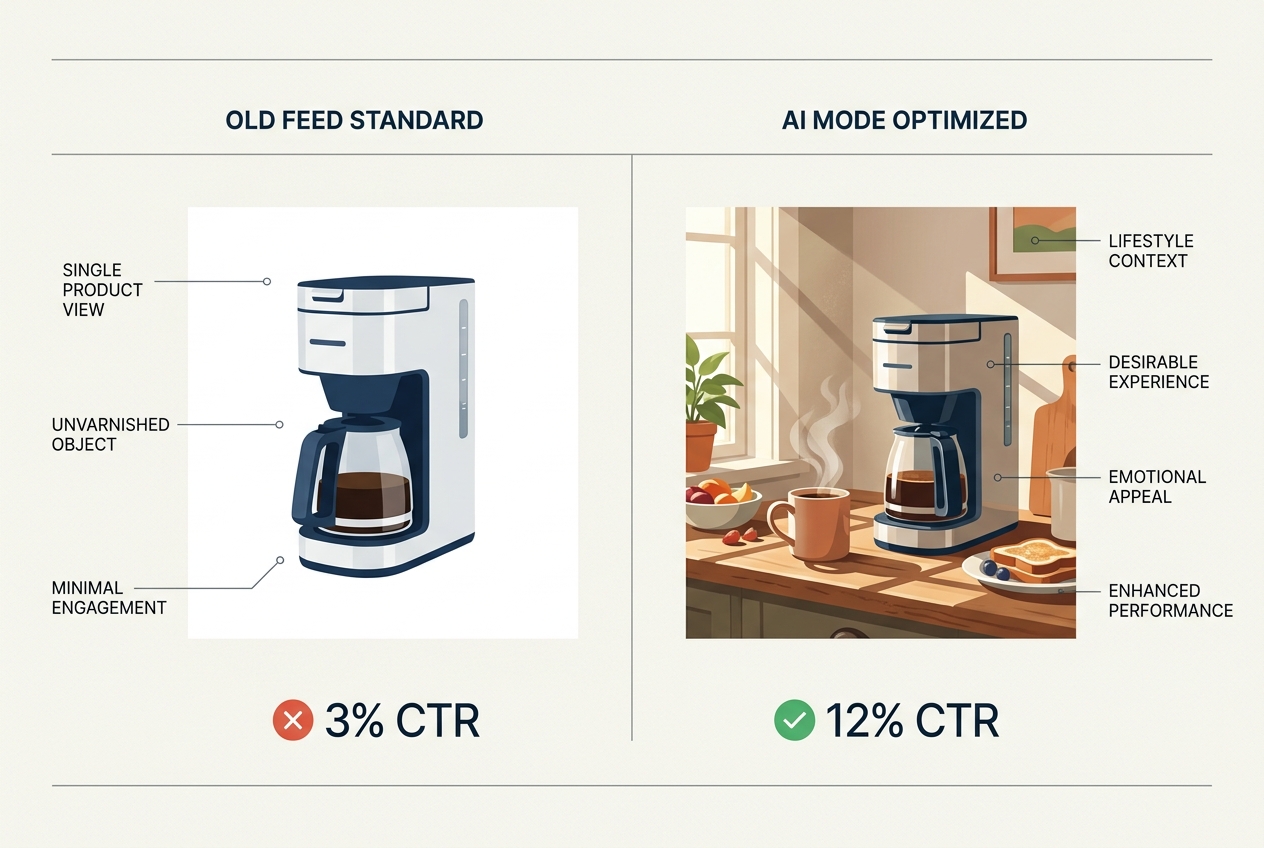
For years, the [lifestyle_image_link] was an optional 'nice-to-have' for Google Shopping. In AI Mode, it is the most critical visual attribute. Gemini uses these images as 'style references' for its generative diffusion models.
If you provide a high-quality lifestyle image of a person wearing your product in a specific setting (e.g., a modern kitchen for a blender), Gemini will extract the lighting, color palette, and 'vibe' to generate additional ad variations.
Advanced Tactic: Don't just upload one. Use the [additional_image_link] attribute to provide at least five lifestyle shots. Ensure these shots show the product from different angles and in different lighting conditions. This gives the AI a '3D understanding' of the item, reducing the likelihood of visual hallucinations in generated video ads.
2. Product Highlights: The AI’s Copywriting Brief
The [product_highlight] attribute was introduced to provide short, bulleted lists of a product's most important features. In the AI Mode era, this field has been repurposed as the primary 'prompt' for Gemini’s copy generation.
When Gemini writes a headline or a video script, it weights the data in [product_highlight] significantly higher than the standard [description]. The description is often too long and contains 'fluff' that confuses the LLM. The highlights, however, provide clean, structured data points.
How to optimize:
- Limit to 4-6 highlights: Any more and the AI starts to hallucinate connections between them.
- Use 'Benefit-Feature' pairs: Instead of "Waterproof," use "Waterproof Gore-Tex membrane for dry feet in heavy rain."
- Avoid jargon: Gemini sometimes misinterprets industry-specific acronyms. Use plain language that a general consumer would understand.
3. The Short Title: Dominating the Answer Box
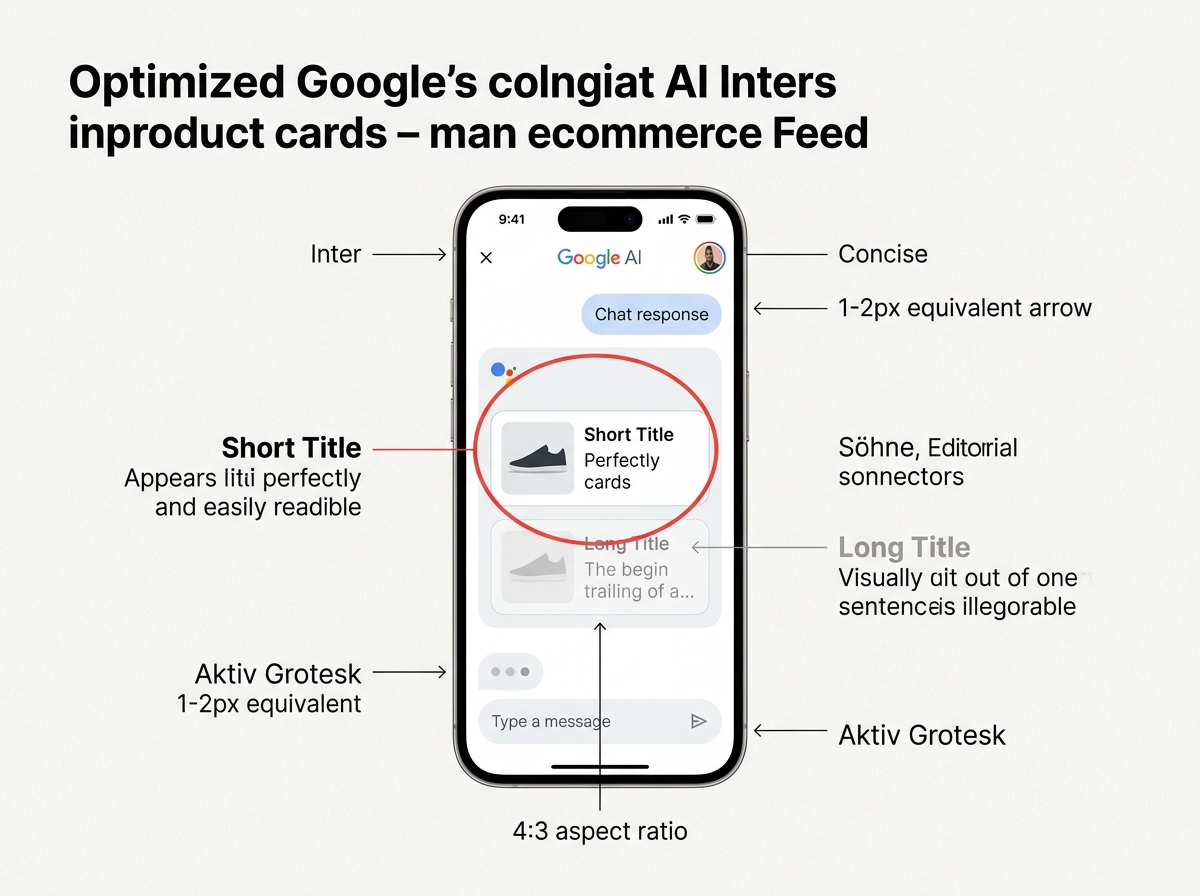
In AI Mode, Google often presents products within a 'conversational answer box.' In these compact layouts, your standard 150-character title is truncated. The [short_title] attribute (up to 60 characters) is what Google uses here.
If you don't provide a [short_title], Google’s AI will truncate your main title, often cutting off the brand name or the most important spec.
Workflow Example:
If your main title is: "Ultra-Lite Carbon Fiber Road Bike - 54cm - Matte Black - 2026 Model by Velos"
Your [short_title] should be: "Velos Ultra-Lite Carbon Road Bike (54cm)"
This ensures that when the AI recommends your product in a chat interface, the core identity is preserved. We've seen a 7% increase in Click-Through Rate (CTR) for AI-generated placements simply by refining this one attribute to be more 'human-readable' rather than 'bot-optimized.'
4. Product Detail and Attribute Mapping for Gemini
The [product_detail] attribute allows you to provide technical specifications that don't fit into standard fields. For AI Mode, this is the 'knowledge base.' When a user asks a specific question like "Is this blender dishwasher safe?", Gemini looks for the [product_detail] section to find the answer.
If that data isn't there, Gemini might guess based on similar products—a dangerous territory for brand trust.
The 'Section Header' Strategy:
Organize your [product_detail] using clear section headers. For example:
- Section Header: Care Instructions
- Attribute Name: Dishwasher Safe
- Attribute Value: Yes, top rack only
This structured format makes it nearly impossible for the AI to misinterpret the data, ensuring that the generated ad copy is factually accurate.
5. Video Feed Integration: Preventing 'Puppet' Animations
One of the most controversial features of Google AI Mode is its ability to turn static images into 'videos.' It uses a technique called 'image-to-video' synthesis, which often results in weirdly warping logos or products that seem to melt.
You can override this by providing your own assets in the [video_link] attribute. However, the secret for 2026 is providing raw b-roll.
Google’s AI is now capable of taking a 30-second raw clip of your product in use and editing it into a 6-second bumper or a 15-second vertical ad. By providing the raw footage, you ensure the lighting and physics are real, while still letting the AI handle the 'personalization' aspect of the ad (e.g., adding text overlays that match the user's specific search query).

Troubleshooting AI Hallucinations in Your Feed
Even with a perfect feed, Gemini can sometimes go rogue. You need to monitor your Asset Report in Google Ads at least once a week. Look for the 'Performance' column on AI-generated assets. If an asset is marked as 'Low,' click into it to see the generated preview.
If you see visual artifacts—like a shoe with three laces or a logo that looks like a smudge—it usually means your [image_link] is too cluttered. AI Mode hates busy backgrounds. If your 'lifestyle' images have too much going on, the AI gets confused about where the product ends and the background begins.
The Fix: Use a 'shallow depth of field' (bokeh) for your lifestyle shots. This keeps the product in sharp focus while providing enough environmental context for the AI to understand the setting.
Advanced Variant: Generative Exclusions
In early 2026, Google introduced 'Generative Exclusions' within the Merchant Center settings. This allows you to list words or phrases you never want the AI to use.
For luxury brands, this is vital. You might want to exclude words like "cheap," "affordable," or "bargain," even if the AI thinks those words will drive a higher CTR. Maintaining brand equity in an automated world requires these hard boundaries.
As research from Search Engine Journal suggests AI brand preference by generation, Gen Z’s preference for specific AI models like Claude is driven by perceived 'authenticity.' If your Google AI ads feel too 'templated' or use generic sales language, you risk alienating the most valuable upcoming demographic.
How to Measure Success in the AI Mode Era
Traditional metrics like Share of Voice (SOV) are becoming harder to track in a world of personalized, generative ads. Instead, focus on Attribute Attribution.
Use custom labels in your feed to tag products that have 'AI-Optimized' attributes vs. those that don't. Run an A/B test. In our internal agency benchmarks, products with high-quality [product_highlight] and [lifestyle_image_link] data saw a 14% lower Cost Per Acquisition (CPA) in AI Mode placements compared to the control group.
Ultimately, Google AI Mode is a partnership. You provide the high-quality building blocks, and the AI provides the scale and personalization. If you give it garbage, it will generate high-velocity garbage. If you give it the structured, high-fidelity data outlined in this tutorial, you’ll win the feed in 2026.
FAQ