OpenAI’s pivot from a subscription-only model to an ad-supported behemoth was inevitable, but for performance buyers, it’s a minefield. Recent reports from Adweek indicate that OpenAI is finally testing exclusion targeting for ChatGPT ads, a move that comes after months of frustration regarding the 'black box' nature of conversational placements.
If you’ve been running ads in ChatGPT, you’ve likely noticed the disconnect. Research from SE Ranking and Seer Interactive recently highlighted a significant gap: ChatGPT ads often bear little to no relevance to the user's active prompt. Worse, without guardrails, your high-budget creative for a luxury skincare brand could appear directly beneath a prompt asking for advice on a medical emergency or a sensitive political debate.
Why it matters: As conversational AI becomes a primary search alternative—with Gen Z preferring tools like Claude and ChatGPT over Google for specific intent—marketers must treat these placements with the same scrutiny as a YouTube exclusion list. If you don't audit your placements, you aren't just wasting spend; you're risking brand equity in a medium where the 'content' is generated by unpredictable users in real-time.
Key takeaways
- Exclusion Lists are Non-Negotiable: OpenAI's new testing allows for category-level exclusions similar to Meta’s Brand Safety Hub.
- Intent Over Keywords: Traditional keyword negative lists fail in conversational AI; you must target the intent of the conversation.
- Audit Frequency: Conversational trends shift faster than search trends. A monthly audit is the bare minimum for high-spend accounts.
Step 1: Map your high-risk conversational categories
Before you touch the OpenAI dashboard, you need to define what 'off-brand' looks like in a conversational context. Unlike a static webpage where a keyword like 'shot' might refer to photography or a vaccine, in ChatGPT, the context is the entire thread history.
You aren't just excluding keywords; you are excluding 'User Intents.' For example, a travel brand might want to avoid appearing in conversations related to 'flight cancellations' or 'natural disasters,' even if the user mentioned 'vacation' earlier in the thread.
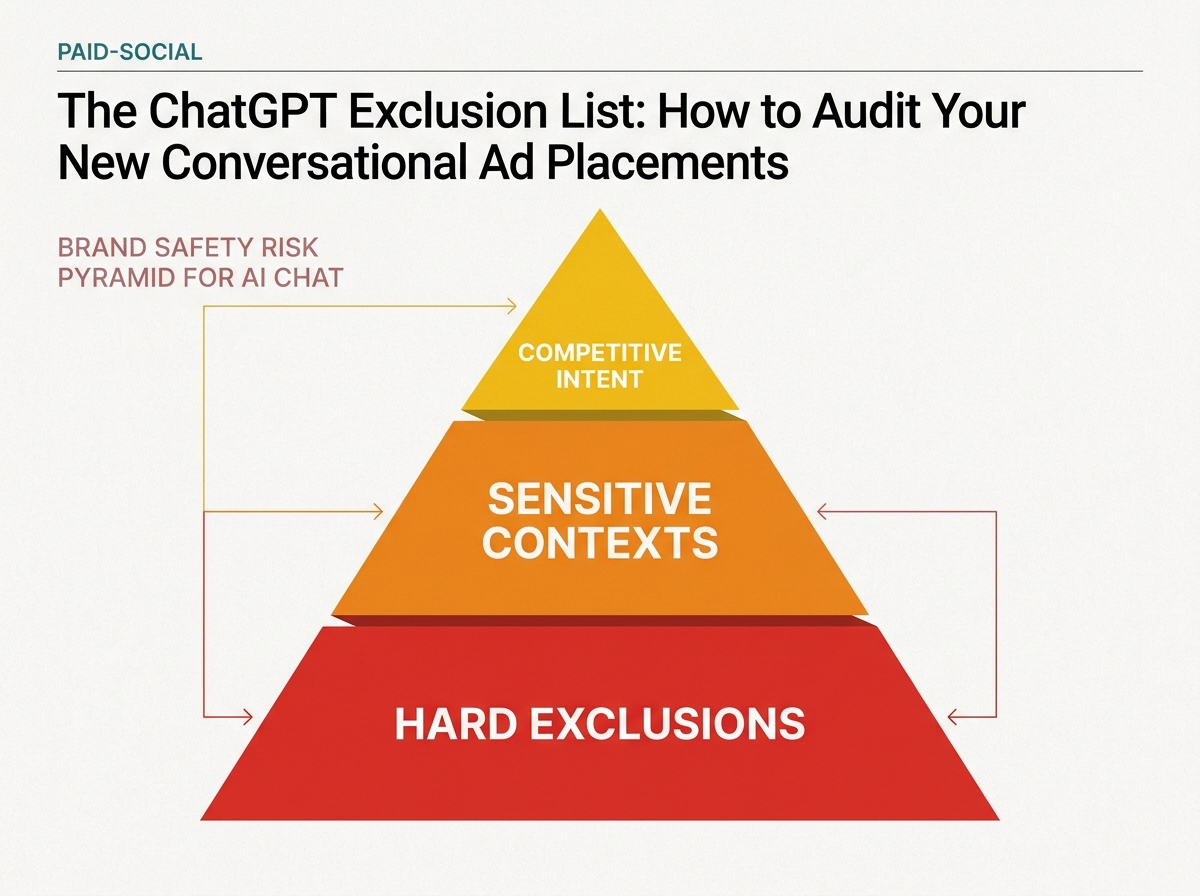
Start by categorizing your exclusions into three buckets:
- Hard Exclusions: Illegal acts, explicit content, and hate speech (usually handled by OpenAI's internal safety layers, but worth reinforcing).
- Sensitive Contexts: Medical advice, financial crisis management, or political debates.
- Competitive/Irrelevant Intent: Users asking for free alternatives to your product or technical support for a competitor.
Common Pitfall: Many strategists simply copy-paste their Google Ads negative keyword list. This is a mistake. ChatGPT is semantic. If you exclude the word 'bad,' you might accidentally exclude a user saying 'this isn't a bad idea,' which is a positive signal. Focus on broad topic categories instead.
Step 2: Access the OpenAI Ad Manager Exclusion Interface
OpenAI’s ad platform is currently in a semi-closed beta, but the exclusion tools are rolling out to those with 'Enterprise' or 'Partner' level seats. Navigate to your Account Settings and locate the 'Brand Safety & Placements' tab.
Here, you will find the new 'Conversational Exclusions' module. This is where you can upload your CSV of blocked topics. Unlike TikTok, which recently expanded public placement opportunities with relatively broad controls, OpenAI is attempting to offer more granular 'topic-cluster' exclusions.
When you upload your list, the system doesn't just look for matches; it uses its own LLM to determine if a user’s conversation semantically overlaps with your excluded categories. This is a double-edged sword: it’s more comprehensive, but it can also lead to over-exclusion if your categories are too broad.
Why it matters: According to Search Engine Journal, AI brand preference is splitting by generation, with Gen Z showing a 7-to-1 preference for Claude over other tools in certain creative tasks. If you are targeting younger demographics on ChatGPT, your brand safety needs to be airtight to avoid the 'cringe' factor of misplaced ads in a highly personal chat interface.
Step 3: Implement Semantic Negative Clusters
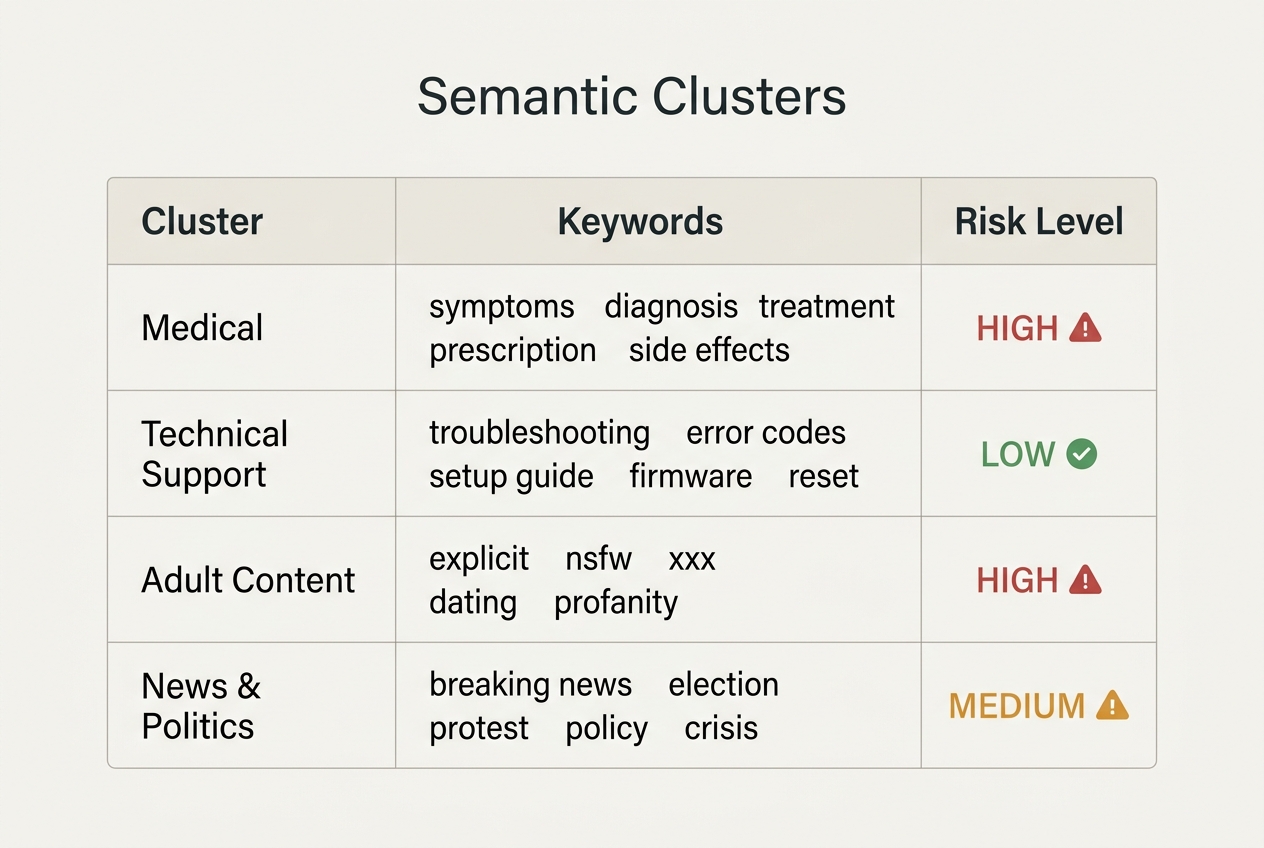
Instead of single words, you must now build 'Semantic Clusters.' A cluster is a group of related concepts that define a no-go zone.
For instance, if you are Estée Lauder—who recently entered the 'group chat' space with creative featuring Bowen Yang—you want to ensure your ads appear when users are discussing 'nighttime routines' or 'self-care,' but never when they are discussing 'skin rashes' or 'chemical burns.'
| Cluster Name | Included Concepts | Exclusion Goal |
|---|---|---|
| Medical Distress | Symptoms, diagnosis, emergency, clinic | Prevent ads next to health crises |
| Financial Advice | Bankruptcy, debt relief, tax evasion | Avoid high-stakes financial stress |
| Tech Support | Error code, bug report, how to fix | Avoid users in a frustrated 'fix-it' mindset |
Common Pitfall: Over-relying on OpenAI’s default safety settings. While their internal alignment (RLHF) prevents the bot from generating 'bad' content, it does nothing to prevent your ad from appearing next to a user’s 'bad' prompt. You are responsible for the user-side context.
Step 4: Audit the 'Conversation-to-Ad' Relevance Score
Once your exclusions are live, you need to verify they are working. OpenAI provides a 'Contextual Relevance Report' (currently in alpha). This report doesn't show you the exact user prompts—due to privacy concerns—but it provides a 'Relevance Category' for your top-performing impressions.
If you see a high percentage of impressions under 'General Knowledge' or 'Uncategorized,' your exclusion list is likely too narrow. You want the majority of your spend to hit 'Targeted Intent' categories that align with your brand.
If you are seeing low conversion rates despite high CTR, it’s a sign that your ad is 'interruptive' rather than 'additive.' As MarTech recently noted, content briefs should be built around people and their situations, not just keywords. The same applies here. If the user is in a 'research' mode, a 'buy now' ad is a mismatch.
Step 5: Final Verification and Iteration
How do you know it worked? Look for the 'Placement Shift.' After applying a robust exclusion list, you should see your CPMs stabilize or slightly increase (as you are bidding on higher-quality, safer inventory) and your post-click engagement metrics improve.
Run a 'Shadow Audit' by using a personal ChatGPT account to trigger conversations in your niche. While you won't always see your own ads, observing the types of ads that appear in sensitive threads will give you a baseline for what OpenAI considers 'safe.' If you see a competitor appearing next to a high-risk prompt, take note—that’s a gap in their exclusion strategy you can avoid.
Verification Checklist:
- CSV upload status shows 'Active' in OpenAI Ad Manager.
- Contextual Relevance Report shows < 5% 'Sensitive' overlap.
- Conversion rate per 1,000 impressions has increased by at least 10% post-implementation.
Three Related Tactics to Try Next
Once you have mastered the exclusion list, you need to evolve your creative and targeting strategy to match the unique nature of AI chat.
1. Conversational-First Creative
Stop using standard social banners. The users in ChatGPT are reading and writing. Your ad should look like a helpful 'suggestion' or a 'sponsored resource.' Use text-heavy, high-utility creative that mirrors the tone of the assistant. If the user is asking 'how to,' your ad should provide a 'where to.'
2. Multi-LLM Brand Monitoring
Don't just focus on OpenAI. With Gen Z shifting toward Claude and others, use tools like Brandwatch to monitor how your brand is mentioned across different LLMs. If an LLM consistently associates your brand with a negative topic, you need to address that through broader PR and SEO, not just ad exclusions.
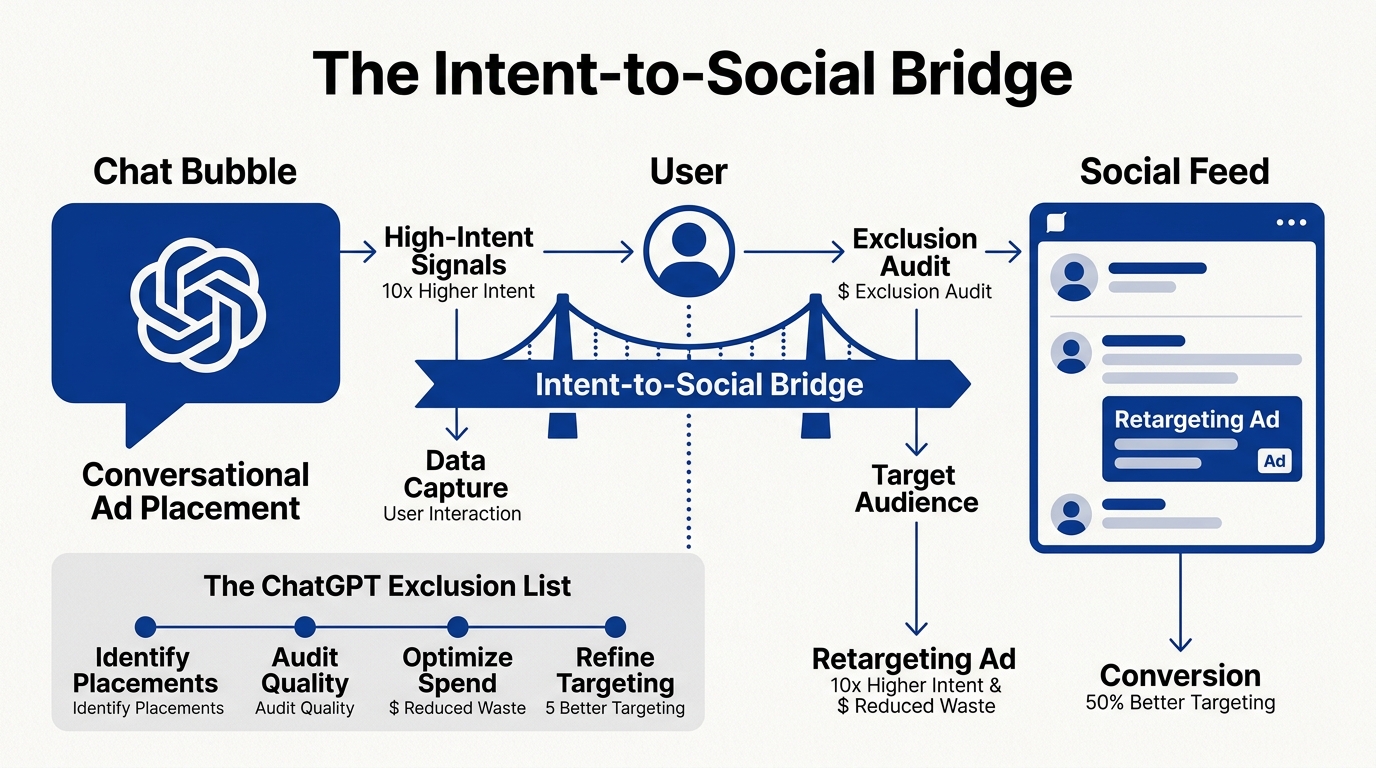
3. Intent-Based Retargeting
Use the data from your ChatGPT placements to fuel your Meta and TikTok campaigns. If a specific 'intent cluster' in ChatGPT is driving high-quality leads, build a 'Lookalike' audience on social based on those specific landing page visitors. This bridges the gap between conversational intent and social awareness.
FAQ