By the time you finish this guide, you will have a repeatable framework for porting high-performing vertical social assets into the high-intent environment of the living room. You don't need a Super Bowl production budget. You need a shift in perspective.
Before you start, ensure you have access to your raw high-resolution vertical assets (4K preferred), a video editor capable of 16:9 composition, and your YouTube Brand Lift or conversion data to benchmark against.
YouTube on TV isn't just a bigger screen; it's a different psychological state. While mobile users are 'leaning in'—scrolling, tapping, and multitasking—TV viewers are 'leaning back.' They are more patient, but they are also physically further from the screen. If you simply stretch a TikTok to fit a 65-inch OLED, you aren't just wasting pixels; you're signaling to the viewer that your brand doesn't understand the medium.
According to recent industry shifts, such as Havas leaning into AI-first identities to drive organic growth (per Adweek, July 2026), the technical barriers to high-end creative adaptation are falling. But the strategic barriers remain. You cannot automate 'vibe.' You have to build it.
TL;DR
- Safe Zones are Non-Negotiable: Mobile-first text overlays often sit too close to the edge for TV overscan or are too small to read from the couch.
- The Pillarbox Opportunity: Don't just use black bars; use the side real estate for secondary branding or social proof.
- Audio is 70% of the Experience: On mobile, sound is a choice. On TV, it is the environment. High-fidelity sound design is mandatory.
- QR Codes are Your Click: Since users can't tap the TV, the QR code is your primary conversion bridge.
Step 1: Re-center the Narrative for the 'Lean-Back' Gaze
Why it matters: On a phone, the human eye focuses on the center-bottom where the thumb rests. On a TV, the eye wanders across the entire 16:9 plane. If your social creative relies on fast-moving text at the very bottom or top of the frame, viewers will miss the hook before they even find it.
What to do: Take your vertical 9:16 asset and place it within a 16:9 canvas. Instead of a simple 'blur' background—which looks like a local news mistake—create a branded 'Command Center.' This means using the left and right pillars of the screen to display static or slow-motion complementary information.
For example, if you are a skincare brand like Glow Recipe, your center vertical video might show the application of a serum. Your left pillar could show a static 'Before' photo, and your right pillar could show the 'After' or a list of key ingredients. This turns a single-focused social ad into a multi-dimensional brand experience that utilizes the screen real estate without requiring a new shoot.
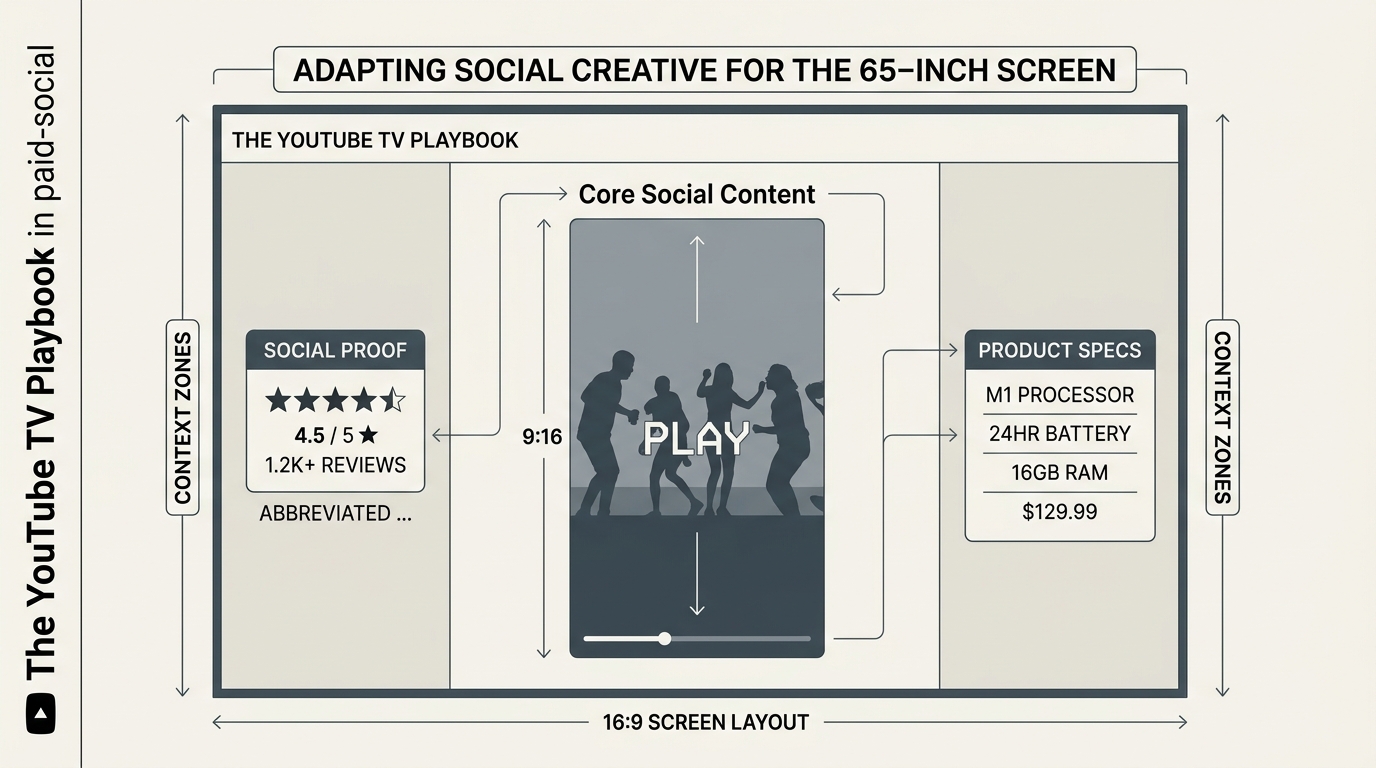
Common Pitfall: Many marketers try to 'zoom and crop' vertical footage to fill the 16:9 screen. This usually results in grainy, low-resolution shots of someone's chin or forehead. Unless you shot in 8K with a massive wide-angle lens, avoid the crop. Embrace the pillars.
Step 2: Optimize Typography for Distance and Overscan
Why it matters: The '10-foot UI' rule is the gold standard for TV. Most social creative uses 12-18pt equivalent font sizes that are legible 6 inches from a face but invisible from a couch. Furthermore, many TV sets have 'overscan'—a legacy setting that crops the outer 5% of the image.
What to do: Strip the native social captions (the ones you added in the TikTok or Reels editor) and replace them with high-contrast, large-scale sans-serif type. Your primary CTA or hook should be at least 20% of the screen height. Ensure all text sits within the 'Title Safe' zone—roughly the center 80% of the screen.
[INTERNAL: How to master typography for mobile-first ads -> typography-social-ads-guide]
Use color to your advantage. Dark mode is generally preferred for living room viewing to avoid blinding the user in a dim room. Use a dark, textured background for your pillars and bright, white or neon text for your key value propositions.
Common Pitfall: Leaving 'burned-in' social captions from the original app. These often overlap with YouTube's own UI elements on the TV app, such as the 'Skip Ad' button or the video progress bar, creating a cluttered, unprofessional mess.
Step 3: Upgrade the Audio Mix for Home Theater Systems
Why it matters: Mobile audio is often compressed and mono-heavy to sound 'loud' on tiny speakers. When that same audio hits a soundbar or a 5.1 surround system, it can sound harsh, tinny, or distorted. YouTube on TV is a cinematic experience; your audio needs to match.
What to do: If you have the budget, go back to the original stems. Increase the dynamic range. Ensure that the voiceover (VO) is crisp and centered, while the background music has some stereo width. If you’re using creator-led content, use AI-driven noise-reduction tools to clean up the 'room hiss' that is often ignored on mobile but glaring on a TV.
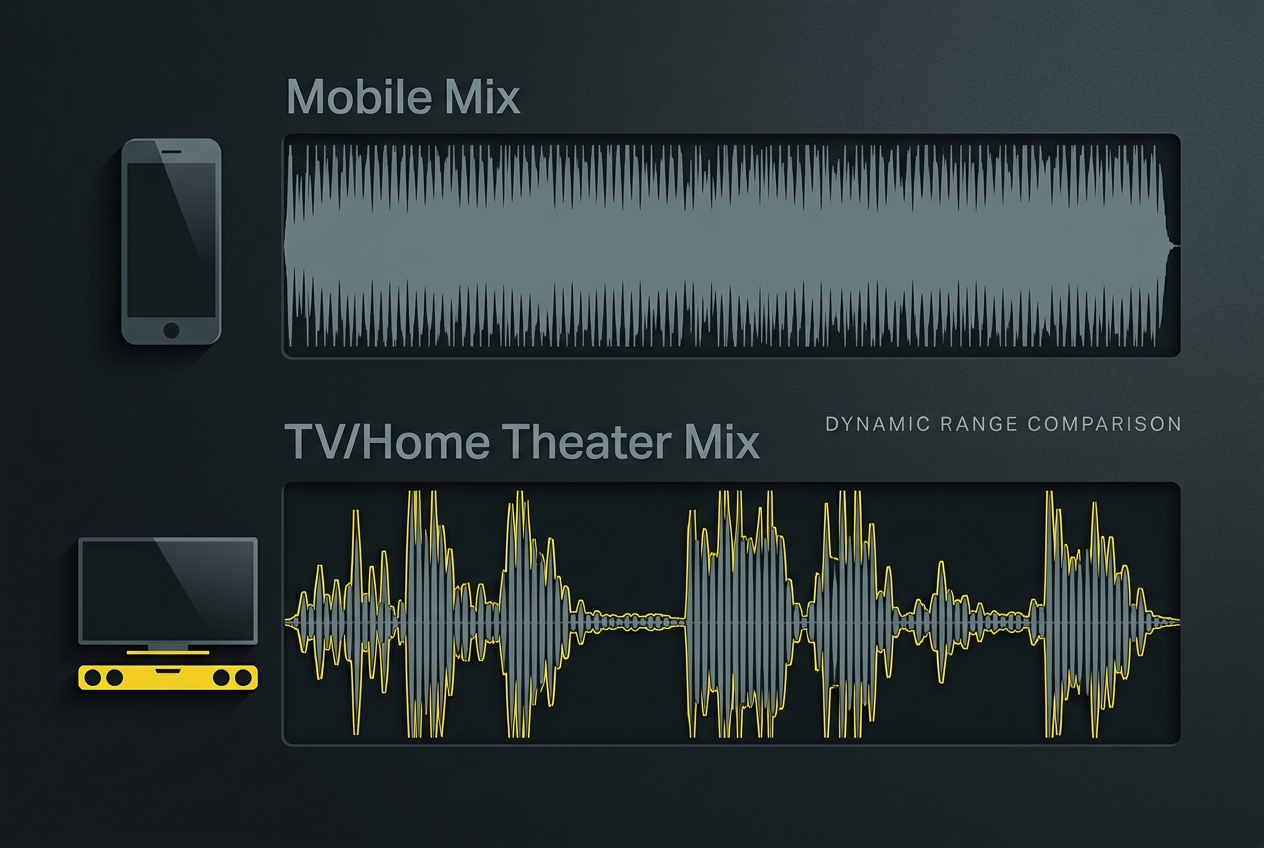
Consider the 'Sound of Silence.' On social, we fear the drop-off, so we fill every second with noise. On TV, a well-placed 1-second pause can actually recapture a wandering viewer's attention.
Common Pitfall: Using 'trending' audio that includes high-pitched screeching or sudden loud noises designed to stop the scroll. On a TV, these are physically painful for the viewer and lead to immediate skips.
Step 4: Implement the 'Dual-Device' Conversion Bridge
Why it matters: You cannot click a TV screen. While YouTube is experimenting with 'Send to Phone' notifications, the most reliable way to drive a direct response from a living room ad is the QR code. However, a QR code that is too small or only on screen for 2 seconds is useless.
What to do: Dedicate one of your side pillars (from Step 1) to a persistent QR code. It should appear after the first 5 seconds and stay until the end of the ad. Frame the QR code with a clear 'Scan to Shop' or 'Claim 20% Off' callout.
Make sure the landing page the QR code leads to is mobile-optimized. It sounds obvious, but many brands send TV viewers to a desktop-heavy site. The user is scanning with their phone; the experience must be seamless. According to Google's recent push into AI Max (per Search Engine Land, July 2026), intent matching is getting better, but the friction of the 'hand-off' from TV to phone is still the biggest killer of CTV ROAS.
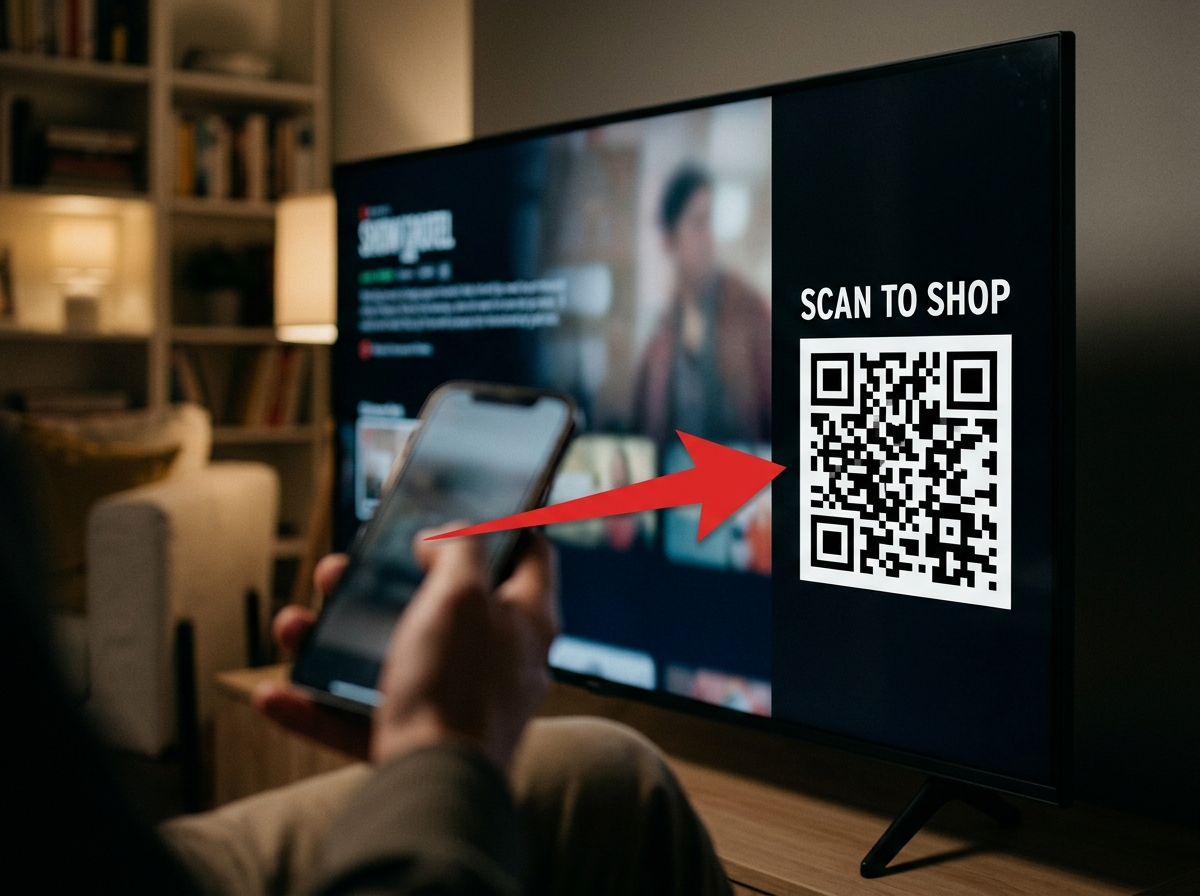
Common Pitfall: Placing the QR code in the center of the video where it covers the creator's face or the product. Keep it in the 'utility' zone of the side pillars.
Step 5: Adjust Pacing for the 'Big Screen' Attention Span
Why it matters: Social video is often edited with 'micro-cuts'—a new angle every 0.8 seconds. This works for a 6-inch screen held in a hand. On a 65-inch screen, this level of rapid movement can actually cause motion sickness or visual fatigue.
What to do: Slow it down. If you are repurposing a TikTok, try to extend the duration of each shot by 10-15% if possible, or use 'slow-motion' transitions to bridge the gaps. You aren't fighting a thumb anymore; you're fighting a remote control. You have a few extra seconds to build an atmosphere.
The psychology of video pacing in 2026
Instead of the 'chaos' edit, try the 'thematic' edit. Group your social clips into clear chapters. If your ad is 30 seconds, spend 10 seconds on the problem, 10 on the solution, and 10 on the social proof. This structured narrative performs better in a lean-back environment than the fragmented style of a standard Reel.
Common Pitfall: Keeping the 'looping' structure of a Short. While looping is great for views on mobile, a TV ad that feels like it’s stuck in a 6-second repeat is frustrating for a viewer who is waiting for the 'Skip' button or the content to resume.
Step 6: Verify and Audit the 'Living Room' Experience
How do you know it worked? Before you push the campaign live to your full budget, you must perform a physical audit.
- The Couch Test: Cast your draft ad to an actual TV. Sit 8 to 10 feet away. Can you read the fine print? Is the QR code scannable without getting up?
- The Soundbar Test: Listen at 30% volume and 70% volume. Does the music drown out the VO?
- The Brand Lift Check: Within 14 days of launch, check your YouTube Brand Lift survey data specifically for the 'TV' device segment. You should see a higher 'Aided Awareness' lift compared to mobile if your creative is properly adapted for the environment.
If your 'View-Through Rate' (VTR) on TV is significantly lower than your mobile VTR, your hook is likely too 'small' for the screen. If your conversion rate is low, your QR code is likely the culprit.
3 Related Tactics to Try Next
Once you have mastered the basic adaptation of social assets for TV, consider these advanced moves:
- Sequential Storytelling (Mobile to TV): Use Google's 'Video Ad Sequencing' to show a user a 15-second 'teaser' on their mobile device during the day, then follow up with a 30-second 'cinematic' version on their TV in the evening. This reinforces the brand across different psychological states.
- Creator-Led CTV: Instead of a polished 'commercial,' use a creator's 'Get Ready With Me' (GRWM) video as a TV ad. The contrast of an authentic, low-fi social video on a high-def TV screen is a powerful pattern interrupt that can stop a viewer from reaching for the remote.
- AI-Enhanced Upscaling: Use tools like Topaz Video AI or similar features within the Havas-style AI stacks mentioned in [S4] to upscale 1080p social footage to 4K. This removes the 'social fuzz' and makes your creator content look like it was shot for Netflix.
YouTube on TV is the new prime time. By treating it with the technical respect it deserves—while keeping the 'social' soul of your creative—you can capture the most valuable attention in the house without the multi-million dollar production price tag.
FAQ