

Every social media manager starts the same way: with a folder of apps on their phone and fifteen browser tabs open to Meta Business Suite, X, LinkedIn, and TikTok. It’s the default because it’s free. But as your brand scales, that 'free' workflow starts to extract a heavy tax in the form of missed comments, fragmented reporting, and the constant friction of context switching.
The question isn't whether Sprout Social is a better tool than a collection of native apps—it is—but whether your specific volume justifies the $199 per month entry point for the Essentials tier. You’re trading cash for time. If you’re managing a single personal brand, the trade might not make sense. If you’re managing three clients with daily posting requirements, the math changes instantly.
Why it matters: Sticking with native posting too long leads to 'operational debt'—where your team spends 80% of their time on manual execution and only 20% on strategy. Upgrading to a professional tool like Sprout Social Essentials is designed to flip that ratio.
TL;DR
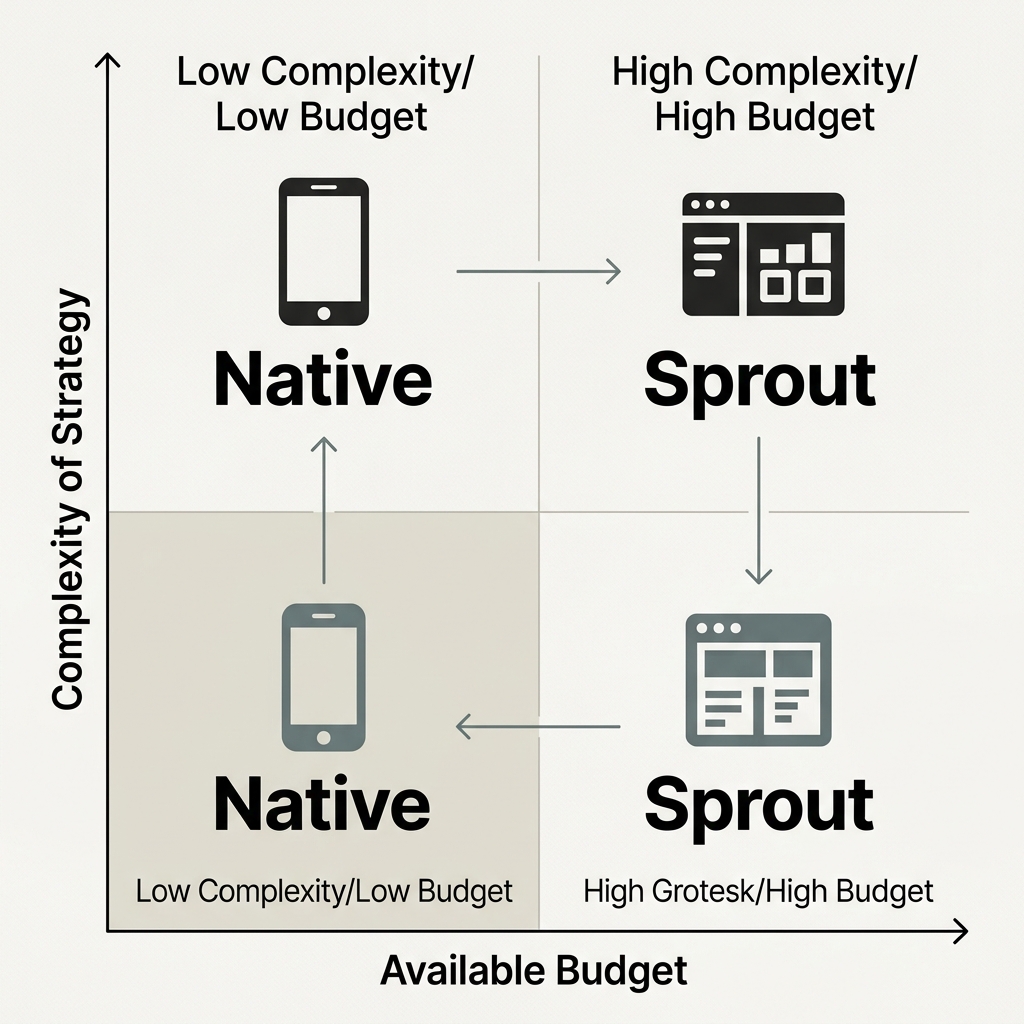
- Native Posting: Best for single-platform creators or businesses with low posting frequency (<3 times a week). High friction, zero cost.
- Sprout Essentials: Best for small teams or solo practitioners managing 4-10 profiles who need unified reporting and a centralized inbox.
- The Switch Point: Upgrade when you spend more than 5 hours a week just logging in and out of platforms or when you can't accurately report cross-platform ROI to stakeholders.
Head-to-Head: Feature Comparison Matrix
Before we dive into the nuances of workflow, let’s look at the hard specs. This comparison pits the collective features of native platforms (Meta Business Suite, TikTok Creator Center, LinkedIn, etc.) against the Sprout Social Essentials offering.
| Feature | Native Posting (Free) | Sprout Social Essentials ($199/mo) |
|---|---|---|
| Profiles Supported | Unlimited (but fragmented) | Up to 5 profiles included |
| Unified Inbox | No (check each app) | Yes (All messages in one stream) |
| Scheduling | Individual per platform | Cross-platform calendar view |
| Asset Management | Local storage / Cloud drives | Integrated Media Library |
| Reporting | Manual export & stitching | Automated, presentation-ready PDFs |
| Approval Flows | No (internal chat/email) | Basic tasking & status tracking |
| AI Assistance | Platform-specific (limited) | Integrated caption & sentiment AI |
The Hidden Cost of the 'Free' Native Workflow
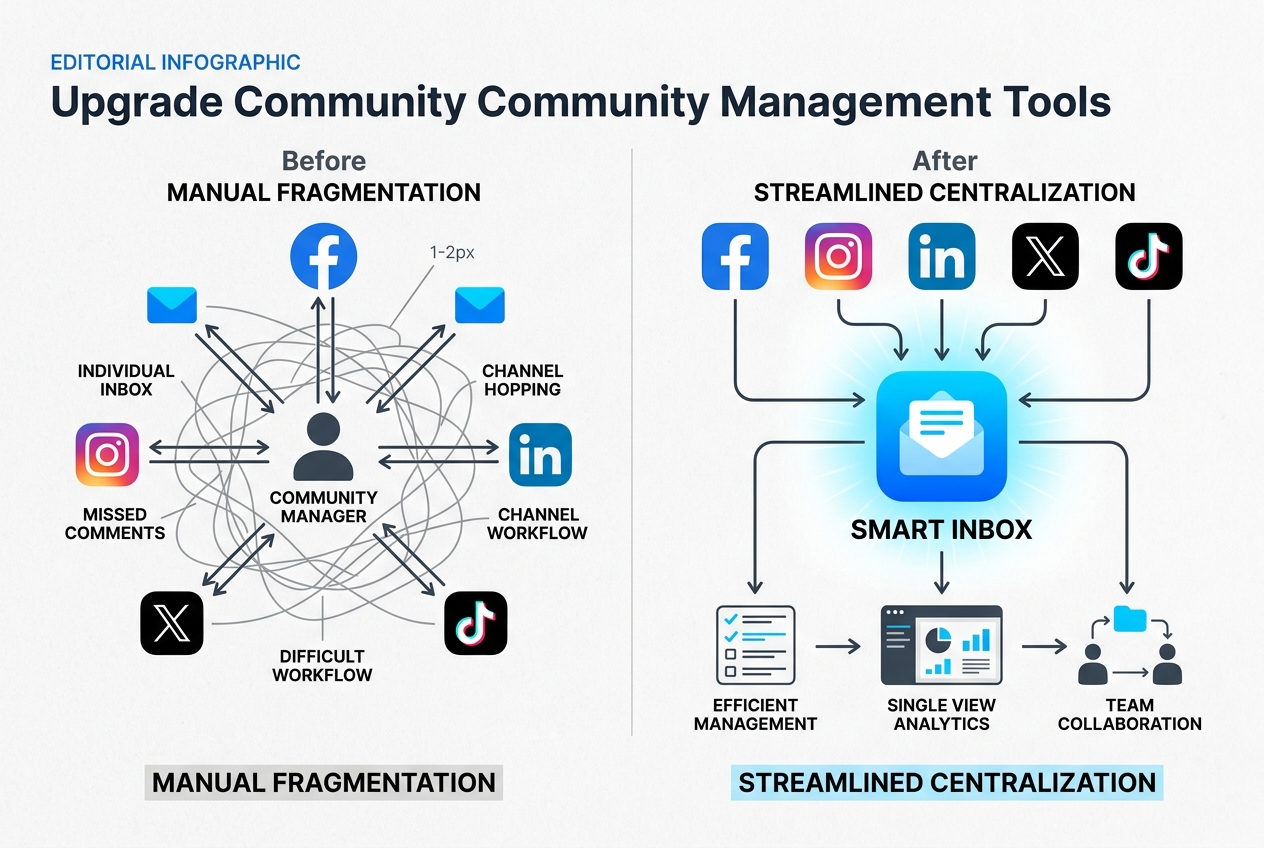
When you use native apps, you aren't just posting content; you're navigating a labyrinth of disparate interfaces. Meta Business Suite has improved, but it still doesn't talk to your LinkedIn company page or your TikTok account. According to internal benchmarks often cited by agency strategists, the average social media manager loses roughly 20% of their productive day simply switching between tabs and re-formatting assets for different specs.
Native posting is inherently reactive. You log in to Instagram to post a Reel, get distracted by a notification, spend ten minutes responding to a comment, and forget to cross-post that same video to TikTok. This fragmentation is the primary driver for moving to a tool like Sprout.
In the native world, your 'Asset Library' is likely a messy Google Drive folder or a Dropbox link. You download the video, upload it to the platform, manually type the caption (which you probably wrote in a separate Notes app), and hit publish. Sprout Social Essentials centralizes this. You upload once to the Sprout Asset Library, apply your tags, and push to all five profiles simultaneously. For a team handling the social desk at a mid-sized brand, this consolidation can save 10+ hours a week.
The Smart Inbox: Where ROI is Won or Lost
Community management is the most undervalued part of the social workflow. In a native environment, you have to open the Instagram app, the TikTok app, and the LinkedIn app to see if anyone has asked a question about your product. If you miss a high-intent question on a TikTok ad—especially with TikTok’s new focus on search and commerce [S5]—you’re leaving money on the table.
Sprout’s Smart Inbox is the 'killer feature' for the Essentials tier. It aggregates every mention, DM, and comment into a single, filterable stream.
Response Time and SLA Tracking
One thing native apps don't give you is a 'Response Report.' If you’re an agency lead, you need to prove to your client that you’re responding to customers within two hours. You can't do that with native apps without a manual spreadsheet. Sprout Essentials tracks these metrics automatically. You can see your average response time and total volume of engagements, which is critical for justifying your headcount or your agency fee.
Analytics: From Data Entry to Strategic Insight
Native analytics are deep but siloed. Instagram Insights will tell you your reach; LinkedIn will show you your visitor demographics [S2]. But try putting those together for a monthly CMO report. You’ll spend hours in Excel, trying to normalize 'Impressions' from X with 'Reach' from Meta.
Sprout Social Essentials provides automated cross-channel reports. These aren't just raw numbers; they are formatted for stakeholders. When the November 2025 algorithm updates shifted engagement signals toward 'shares' over 'likes,' Sprout users were able to see that trend across their entire portfolio instantly.
How to master social media reporting for stakeholders
If you are still copying and pasting numbers into a PowerPoint deck every month, you have already outgrown native posting. The $199 investment pays for itself the moment you stop doing manual data entry.
The Workflow Threshold: When to Make the Move
So, when exactly should you pull the trigger? It’s rarely about the number of followers and almost always about the number of 'actions' required per day.
We recommend upgrading when you hit any two of these three triggers:
- The Multi-Profile Tax: You are managing more than 4 distinct social profiles (e.g., 1 IG, 1 FB, 1 LI, 1 TT, 1 X). At this point, the login/logout cycle is a productivity killer.
- The Approval Bottleneck: You have to send screenshots of your drafts to a boss or client for approval via Slack or Email. Sprout allows you to draft in the tool and share a calendar view, even at the Essentials level.
- The Reporting Gap: You are asked for 'Total Brand Reach' and it takes you more than 30 minutes to calculate it.

Competitive Context: Sprout vs. The Field
It’s worth noting that Sprout isn't the only player. Hootsuite has recently leaned into a 'headless' API strategy [S3], focusing on AI-native workflows that integrate deeply with enterprise tech stacks. Other tools like Buffer or Later offer lower entry prices but often lack the robust 'Smart Inbox' and deep reporting that make Sprout Essentials a favorite for B2B LinkedIn marketing [S2].
If your primary focus is purely visual—say, an Instagram-first brand—native posting or a tool like Later might suffice longer. But for the generalist social media manager who needs to be everywhere at once, the centralized nature of Sprout is the standard.
[INTERNAL: Comparing Sprout Social vs Hootsuite for mid-market agencies -> sprout-vs-hootsuite-comparison]
Dealing with the 'Deal-Breakers'
Sprout Essentials is not perfect. The most common complaint is the price-per-user seat. Unlike some competitors that allow multiple users on a base plan, Sprout is built for the 'one-person social department' at the Essentials level. If you have a team of three people who all need to be in the tool, your costs will scale quickly.
Another deal-breaker for some is the limit of 5 profiles. If you are a freelance manager with 10 small clients, the Essentials plan won't cover you without expensive add-ons. In that specific case, native posting combined with a cheaper scheduler like Metricool might be the better financial move, even if the reporting isn't as polished.
The Verdict: Who Should Pick What?
Choose Native Posting if:
- You are a solo creator or a 'department of one' with a limited budget.
- You focus 90% of your energy on a single platform (e.g., you are a TikTok-first brand).
- You have a low volume of inbound messages and can handle community management manually.
- You don't need to present professional reports to third parties.
Choose Sprout Social Essentials if:
- You manage a brand that needs a presence on LinkedIn, Instagram, and Facebook simultaneously.
- You are drowning in DMs and need a way to ensure no customer question goes unanswered.
- You need to prove the value of social media to a manager or client using data.
- Your time is worth more than $50/hour. If Sprout saves you 4 hours a month, it has paid for itself.
Final Implementation Steps
If you decide to make the jump from native to Sprout, don't just dump your old process. Start by auditing your current 'time-wasters.' Use a tool like Toggl to track how long you spend on native posting for one week.
Once you sign up for the Essentials trial, your first move should be connecting your 'Big Three' accounts—typically LinkedIn, Instagram, and Facebook. Set up your Smart Inbox filters immediately. By the end of the 30-day trial, the difference in your stress levels and your reporting clarity will tell you everything you need to know.
Social media management in 2026 is no longer about just 'posting content' [S4]. It is about managing a complex ecosystem of search, commerce, and community. Native apps are great for the 'posting' part, but they fail at the 'management' part. If you’re ready to treat social as a business function rather than a chore, the upgrade is inevitable.
FAQ