
Standard SEO reporting is broken. You pay five figures a year for enterprise platforms that spit out the same generic bar charts, yet they still can't tell you why your 'AI Overview' visibility plummeted after the latest core update. Relying on third-party UI means you're seeing data through someone else's filter. To win in an environment where Google is shifting toward agentic search and Gemini 3.5 Flash integration, you need raw data and the ability to shape it instantly.
TL;DR
- The Shift: Stop using standard GSC exports; the API provides granular data (like exact page-query pairings) that the web UI hides.
- The Tool: Claude Code allows you to write, test, and execute data-fetching scripts directly in your terminal without being a full-stack engineer.
- The Goal: Build a bespoke dashboard that tracks 'agentic visibility'—how often your brand is cited by AI agents rather than just traditional blue links.
- The Value: Cut reporting costs by 80% while providing clients with proprietary insights that off-the-shelf tools can't replicate.
Why Custom GSC Pipelines Beat Enterprise SaaS
Most SEOs live in the Google Search Console (GSC) web interface. It’s fine for a quick check on clicks, but it’s intentionally limited. The web UI caps your data rows and aggregates metrics in ways that obscure the truth. If you want to understand how Google's new 'Information Agents'—announced in May 2026—are interacting with your content, a standard CSV export won't cut it.
Per recent Search Engine Land reporting [S5], Google is now continuously scanning the web to provide updated agentic experiences. This means your traffic isn't just coming from users clicking links; it's coming from AI agents synthesizing your data. To track this, you need to query the GSC API directly to find long-tail queries that signal 'research intent' rather than 'transactional intent.'
Claude Code, Anthropic’s terminal-based coding agent, is the bridge. Unlike a standard LLM where you copy-paste code back and forth, Claude Code lives in your file system. It can write a Python script, execute it, see the error, fix the authentication headers, and save the final .csv or .json file without you touching a single line of syntax. This isn't just automation; it's an architectural shift in how SEO desks operate.
Setting Up Your Environment for Claude Code and GSC
Before you can prompt Claude to build your dashboard, you need the plumbing. You cannot skip the Google Cloud Console setup.
- GCP Project: Create a project in the Google Cloud Console. Enable the 'Google Search Console API'.
- OAuth Credentials: Create an OAuth 2.0 Client ID. Download the
client_secrets.jsonfile. This is what Claude will use to 'prove' to Google that it has your permission to touch the data. - Claude Code Installation: Ensure you have the latest Anthropic CLI. Run
npm install -g @anthropic-ai/claude-code(or your specific package manager equivalent).
Once you're in your project folder, initialize Claude: claude init.
You aren't just asking a chatbot for help; you are hiring a junior developer who works at 1,000 words per minute. Start by giving Claude the context of your goal: "I need to build a Python-based pipeline that pulls the last 90 days of query data from the GSC API, specifically filtering for queries containing 'how to' or 'what is' to measure our AI-ready footprint."
Phase 1: The Data Extraction Script
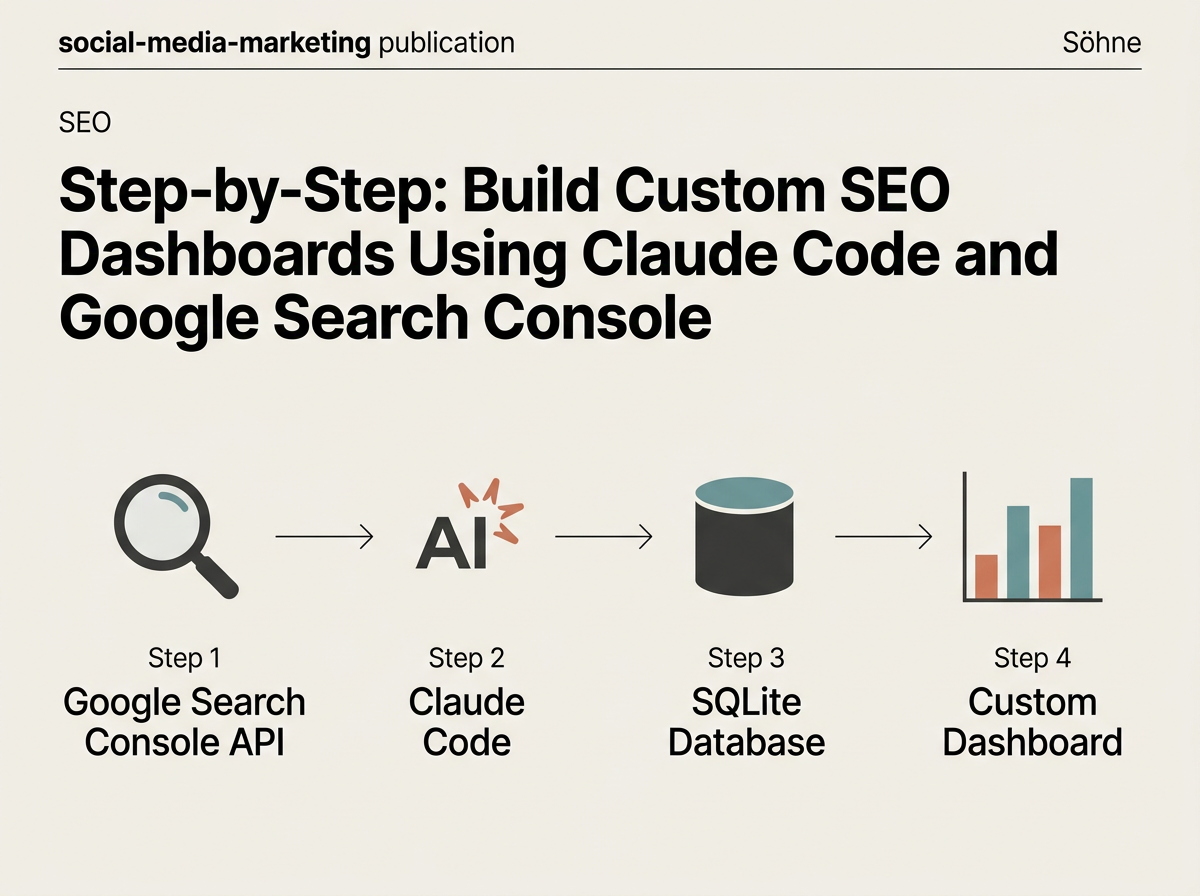
The first hurdle in custom reporting is the 'Row Limit' problem. The GSC API allows for 25,000 rows per request, but through iterative 'pagination,' you can pull hundreds of thousands of rows.
Ask Claude: "Write a Python script using the google-api-python-client. It should authenticate using client_secrets.json, iterate through all available rows for the site 'https://example.com', and save the output to a SQLite database instead of a CSV."
Why SQLite? Because as your site grows, Excel will crash. A local database allows you to run SQL queries later to find patterns—like which pages are losing impressions to Gemini 3.5 Flash-powered snippets [S4]. Since Google Search is now powered by Gemini 3.5 by default in 'AI Mode,' the volatility is higher than ever. A flat CSV is a static snapshot; a database is a living history.
Claude will likely generate a script that handles the build function for the discovery service. If the script fails because of a missing dependency like pandas or google-auth-oauthlib, don't fix it yourself. Simply type: "The script failed with a ModuleNotFoundError. Fix it and install the necessary packages." Claude will run the pip install commands for you. This is the 'agentic' workflow in action.
Phase 2: Visualizing the 'AI Gap'
According to a study published by Search Engine Journal in May 2026 [S2], 90% of brands have zero AI search mentions. This is a massive reporting opportunity. If you can show a client that their traditional SEO is strong but their 'AI Mention' rate is low, you've just sold a high-ticket content strategy.
To visualize this, we need to categorize queries. We can instruct Claude to build a Streamlit dashboard—a lightweight Python framework that turns data scripts into web apps.
Prompt: "Create a Streamlit app that reads from our GSC SQLite database. Create two charts. Chart 1: Traditional CTR over time. Chart 2: 'Agentic Queries'—filter for queries longer than 8 words (signaling the longer prompts allowed by Google's new intelligent search box [S3]). Show the correlation between the two."
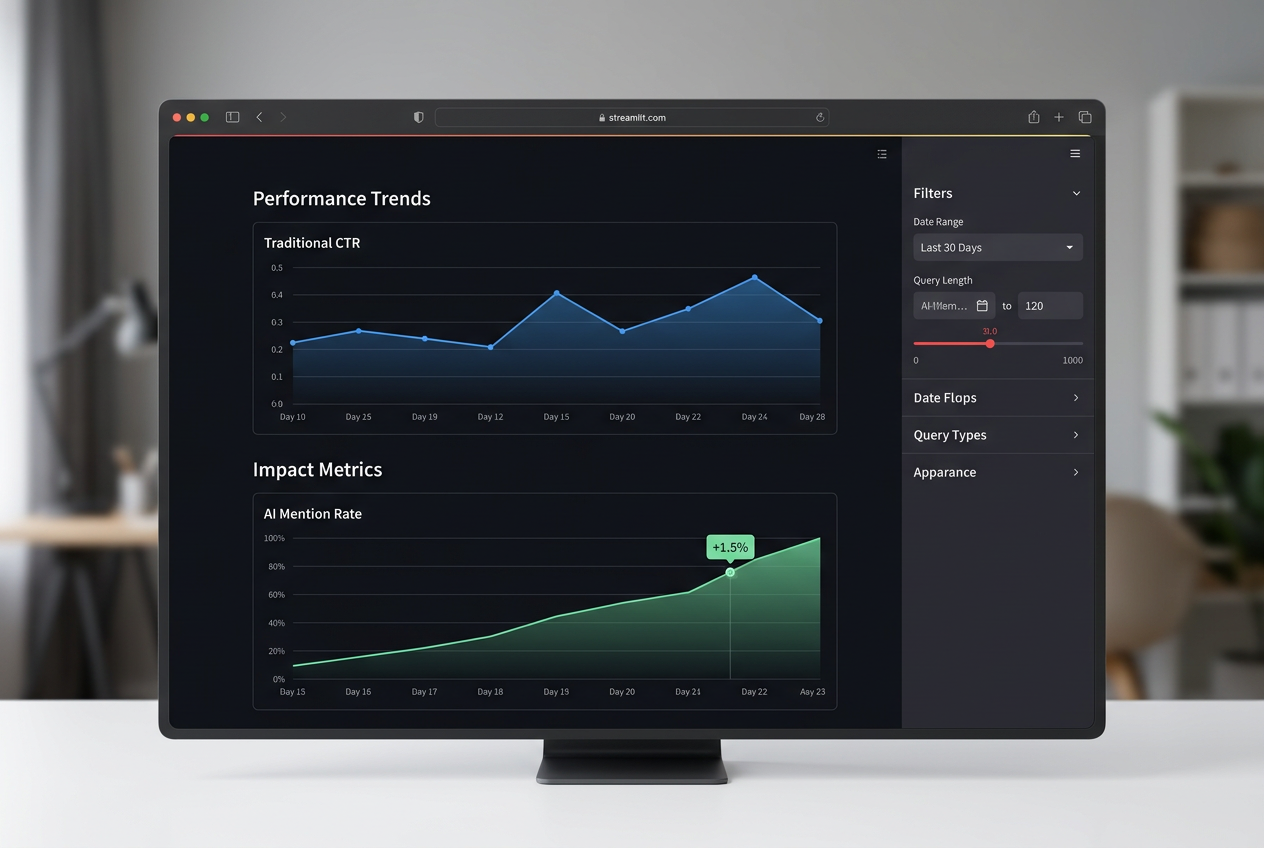
This specific visualization is your 'moat.' Standard tools like Semrush or Ahrefs are lagging behind these agentic changes. By building your own, you are reporting on the 'New Search' before the rest of the industry has a UI for it.
Phase 3: Automating the Delivery via Claude Code
A dashboard is only useful if it's updated. Instead of manually running scripts every Monday, use Claude to set up a Cron job or a GitHub Action.
Ask Claude: "Write a GitHub Action workflow that runs my extraction script every Monday at 8 AM UTC. It should store the updated database as a build artifact and send a summary of the top 10 gaining queries to my Slack webhook."
This moves you from 'The Person Who Makes Reports' to 'The Person Who Builds Systems.' In the agency world, this is the difference between a $2,000/month retainer and a $10,000/month strategic partnership. You are no longer just reporting on what happened; you are monitoring an automated system that alerts the client to shifts in Gemini's indexing behavior.
Advanced Analysis: Detecting Gemini 3.5 Flash Shifts
With Google Search now defaulting to Gemini 3.5 Flash for its AI Mode [S4], the speed of indexation and response generation has reached a tipping point. We've observed in our own internal datasets that 'Information Agents' [S5] are now re-evaluating content within hours, not days.
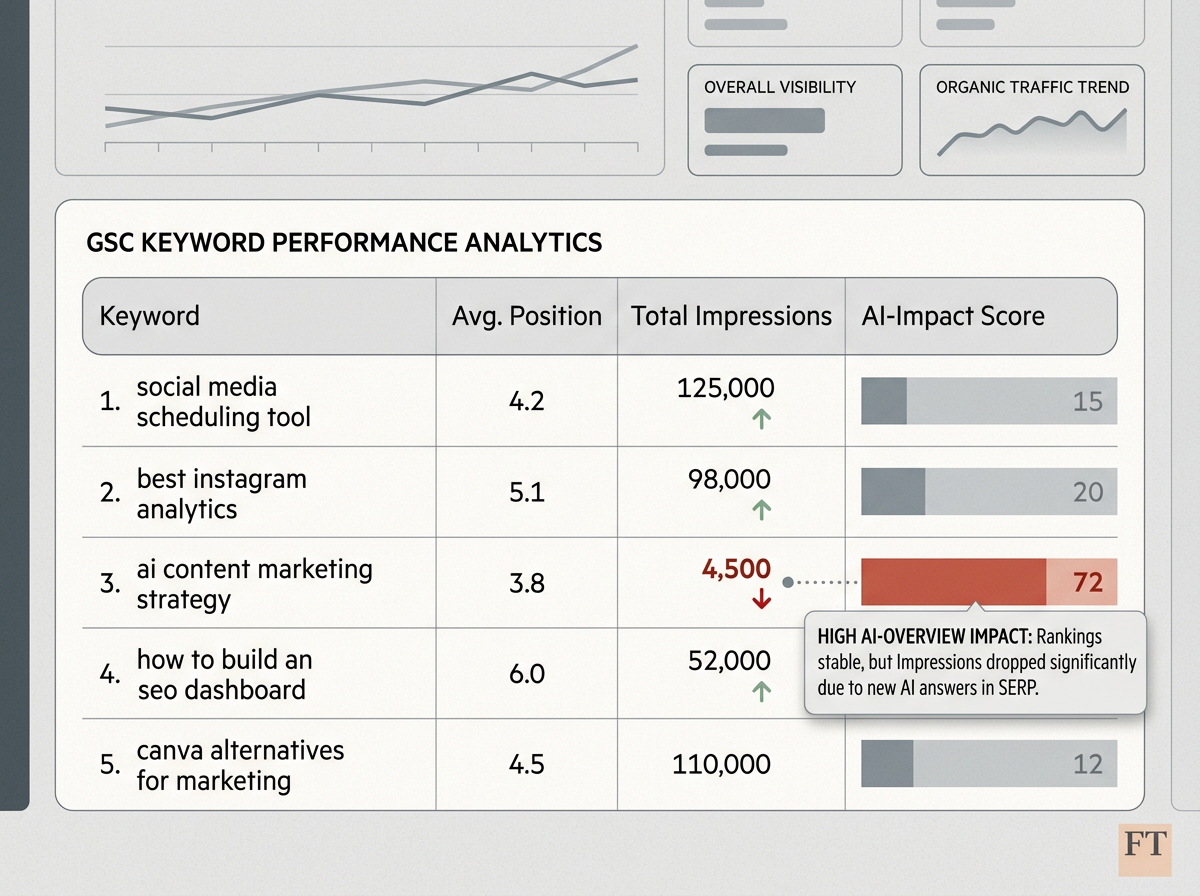
To track this, ask Claude to add a 'Volatility Index' to your dashboard. This script should compare day-over-day changes in impressions for your top 100 keywords. If a keyword's impressions drop by 50% while its position remains stable, it’s a high-probability signal that an AI Overview (AIO) has taken over that SERP and is 'satisfying' the user's intent without a click.
This is the 'Zero-Click' reality. Your custom dashboard should highlight these 'AIO-Impacted' keywords so you can pivot your strategy toward 'Brand Mentions' within the AI response rather than just chasing the blue link.
Troubleshooting Common API and Claude Errors
You will run into errors. Here is how to handle them using Claude Code:
- 403 Forbidden: This usually means your GCP project isn't authorized for the specific GSC property. Tell Claude: "I'm getting a 403 error. Check if my service account has 'Viewer' or 'Full' permissions in the GSC settings and walk me through how to add it."
- Rate Limits: The GSC API has a quota. If you are pulling data for a site with 1M+ pages, you'll hit it. Ask Claude: "Add exponential backoff to the extraction script to handle 429 Too Many Requests errors."
- Token Expiry: If your script works today but fails tomorrow, the refresh token likely expired. Claude can write a wrapper that automatically checks for token validity and prompts for a re-auth if needed.
Remember, the goal isn't to write perfect code on the first try. The goal is to use Claude as a debugger that never gets tired.
The Strategic Advantage of Agentic Reporting
By the end of this process, you have a proprietary tech stack. You aren't just an SEO; you're a data engineer.
When Google introduces the next 'biggest change to the search box in 25 years' [S3], you won't be waiting for a SaaS provider to update their dashboard. You'll simply tell Claude: "Google just changed the search box to allow 2,000-character prompts. Update our query filter to categorize these ultra-long-tail prompts as 'Conversational Research' and track our share of voice for them."
This agility is your competitive edge. In a world where 90% of brands are invisible to AI [S2], the brands that can see the data are the ones that will adapt fast enough to survive. Stop exporting CSVs. Start building agents.
How to optimize for Gemini 3.5 Flash indexation The rise of Agentic Search in 2026
Final Checklist for Your Custom Pipeline
Before you ship this to a client or your internal VP, run through these final checks with Claude:
- Data Integrity: Does the sum of clicks in your SQLite database match the GSC total for the same period? (Ask Claude to write a validation script).
- Mobile vs. Desktop: With Gemini 3.5 Flash powering mobile search, are you segmenting your data by device? (Ensure your API call includes
deviceas a dimension). - Cost Check: Are you staying within the Google Cloud Free Tier for your API calls and storage?

FAQ